
Chat, live dashboards, collaborative editing, trading screens and task notifications all need the same thing: the server must tell the client about a change the moment it happens. Ordinary HTTP only answers when the client asks, so teams fill the gap with polling, which wastes requests and still arrives late. WebSockets solve the problem, and they bring their own: thousands of open connections to scale, mobile devices that drop them, and security checks that browsers do not do for you.
WebSockets are the right choice when both the client and the server need to send frequent updates with low delay, while server-sent events suit one-way streams to browsers, and webhooks suit notifications between servers.
This article explains how WebSockets work, how they compare with polling, server-sent events and webhooks, what it takes to run them in production, how to secure them and what a real migration looked like. It does not cover WebRTC or video streaming.
Key takeaways
- A WebSocket connection starts as an HTTP request that is upgraded, then stays open for two-way messages in both directions.
- Use WebSockets for frequent, two-way, low-latency updates. Use server-sent events for one-way updates to browsers, and webhooks for server-to-server events.
- Every open connection holds server memory, so scaling means planning connection counts, load balancer timeouts and message fan-out across servers.
- Clients must reconnect automatically and recover messages they missed while disconnected.
- Browsers do not apply the same-origin policy to WebSockets, so the server must check the Origin header and authenticate during the handshake.
- In a delivered project, replacing a PHP WebSocket server with a Node.js layer removed a bottleneck for a franchise task platform, and task completion rose about 17%.
How a WebSocket connection works
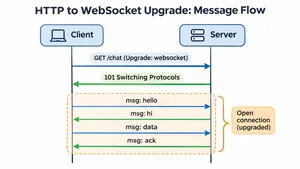
- The client sends an HTTP request with an upgrade header. It asks the server to switch the connection to the WebSocket protocol, using a ws:// or, in production, a wss:// address.
- The server agrees. It replies with status 101 Switching Protocols, and the connection is no longer ordinary HTTP.
- Both sides send messages freely. Messages travel as small frames in either direction, without new headers or new connections.
- Either side can close the connection with a close code, such as 1000 for a normal closure.
The protocol is defined in RFC 6455, published in 2011, and every modern browser, mobile platform and server language supports it.
WebSockets compared with polling, SSE and webhooks
| Polling | Long polling | Server-sent events (SSE) | WebSockets | Webhooks | |
|---|---|---|---|---|---|
| Direction | Client asks repeatedly | Client asks, server answers when it has news | Server to browser only | Both directions | Server to server |
| Delay | Up to the polling interval | Low | Low | Lowest | Low |
| Connection | New request each time | Held open, then reopened | One long HTTP response | One persistent connection | New request per event |
| Reconnection | Not needed | Manual | Built into the browser, with the last event ID | Must be built | Sender retries |
| Works through proxies and firewalls | Always | Usually | Usually | Usually, with configuration | Always |
| Typical use | Rare updates, simple setups | Fallback for older environments | Live feeds, notifications, progress bars, streamed AI responses | Chat, collaboration, live tasks, games, trading | Payments, CRM updates, integrations |
When to choose which
- Choose WebSockets when clients send frequent messages as well as receiving them, such as chat, collaborative editing, live cursors or mobile apps that confirm tasks in real time.
- Choose server-sent events when only the server sends updates to the browser. SSE runs over normal HTTP and reconnects on its own. Under HTTP/1.1, browsers allow only six SSE connections per domain across all tabs, according to MDN, while HTTP/2 raises the limit to about 100 streams by default.
- Choose webhooks when one server needs to tell another server about an event. Browsers and mobile apps cannot receive webhooks. Our guide to webhooks covers that side.
- Keep polling when updates are rare, a delay of a minute is acceptable and simplicity matters most.
Running WebSockets in production
Plan for open connections
Each connected client holds a connection, memory and a file handle on the server, even when nothing is happening. Event-driven runtimes such as Node.js, Go and Elixir handle many thousands of idle connections per server well. Runtimes built around one process or thread per request struggle, which is often the first bottleneck teams hit.
Fan out messages across servers
With several servers, a message for a user may arrive at a server that does not hold that user's connection. A publish-and-subscribe layer, such as Redis, NATS or a managed service, passes each message to every server, and each server delivers it to its own connected clients.
Configure load balancers and proxies
- Forward the Upgrade and Connection headers, which many proxies drop by default.
- Raise idle timeouts. AWS Application Load Balancers close idle connections after 60 seconds by default, and nginx closes proxied connections after 60 seconds without data.
- Send heartbeats, ping and pong frames every 20–30 seconds, so idle connections stay open and dead ones are detected.
Reconnect and recover
Connections drop when phones change networks, laptops sleep or servers restart. Clients should reconnect automatically with exponential backoff and random jitter, so thousands of clients do not reconnect in the same second after a deployment. On reconnect, the client sends the ID of the last message it received, and the server sends what it missed, or the client reloads current state through a normal API call.
Remember mobile limits
Mobile operating systems suspend apps in the background and close their connections. Use WebSockets while the app is open, and push notifications through Apple Push Notification service and Firebase Cloud Messaging for anything the user must see while the app is closed.
Deploy without dropping everyone
A deployment that restarts servers disconnects every client at once. Drain servers gradually, tell clients to reconnect elsewhere before shutting down and keep message formats backward compatible, since old clients stay connected after new servers go live.
Real-time features slowing down or dropping connections? We design, scale and secure WebSocket systems for web and mobile apps.
Explore IT outsourcingWebSocket security
The OWASP WebSocket Security Cheat Sheet covers the details. The essentials:
- Always use wss://. Encrypted connections protect messages and avoid mixed-content errors on HTTPS pages.
- Check the Origin header. Browsers send cookies with WebSocket handshakes to any site, and they do not apply the same-origin policy. Without an Origin check, a malicious page can open a connection in a logged-in user's name, an attack known as cross-site WebSocket hijacking.
- Authenticate at the handshake. Use a short-lived token, check permissions when the connection opens and again for sensitive messages, and close connections when a session ends or permissions change.
- Validate every message. Treat incoming messages as untrusted input, with a schema, size limits and rate limits per connection.
- Never trust a connection address from a URL parameter. In early 2026, the OpenClaw AI assistant was found to accept a WebSocket gateway address from a link without validation. As SonicWall's analysis describes, a victim who clicked a crafted link sent their authentication token to the attacker's server during the handshake, which could lead to remote code execution. The flaw, CVE-2026-25253, rated 8.8 out of 10, was fixed in version 2026.1.29, and later versions added origin validation.
A real migration: real-time tasks for a franchise network
A US quick-service restaurant franchise network, working with .wrk under NDA, runs its daily operations on a task platform. Administrators create task templates, network managers adapt and assign them, and staff complete tasks on mobile with notifications in real time, alongside shift scheduling and inventory.
The real-time layer had become the bottleneck. A PHP WebSocket server struggled under mobile load, and synchronization depended on Simperium, a third-party sync service.
- New real-time layer. .wrk replaced the PHP WebSocket server with a Node.js layer that makes fewer database round trips and holds more connections.
- In-house sync. Synchronization moved to the team's own WebSocket server, removing the dependency on the third-party service.
- Mobile and templates. The Swift app received real-time task notifications, in-app purchases and a flexible template hierarchy that matches how franchises run shifts.
The work was delivered in a four-month window. Task completion across the network improved by about 17%, and the gains held over time. Read the franchise operations case study.
Common WebSocket errors and what they mean
| Error | Usual cause | Fix |
|---|---|---|
| Close code 1006, abnormal closure | The connection dropped without a close frame: network loss, proxy timeout or server crash | Add heartbeats, raise proxy timeouts, reconnect automatically |
| Handshake fails with 400 or 426 | A proxy or load balancer removed the Upgrade headers | Forward Upgrade and Connection headers, enable WebSocket support |
| Connection closes after exactly 60 seconds | Idle timeout on a load balancer or proxy | Send pings more often than the timeout, or raise the timeout |
| Mixed content error | The page uses HTTPS and the connection uses ws:// | Use wss:// |
| Close code 1008, policy violation | The server rejected the origin, token or message | Check origin settings and token expiry |
| Messages lost after reconnect | No resume logic | Track the last message ID and replay or reload state |
Frequently asked questions
What are WebSockets used for?
WebSockets are used for features that need instant two-way updates: chat, live dashboards, collaborative editing, multiplayer games, trading screens, live support and real-time task or delivery tracking in mobile apps.
What is the difference between WebSockets and HTTP?
HTTP sends a request and receives a response, then the exchange ends. A WebSocket connection starts with an HTTP request, upgrades to a persistent connection and lets the client and server send messages to each other at any time.
Should I use WebSockets or server-sent events?
Use server-sent events when the server only needs to push updates to a browser, such as notifications or streamed results. Use WebSockets when the client also sends frequent messages, or when you need the lowest delay in both directions.
Are WebSockets secure?
WebSockets are secure when they use wss:// encryption, the server checks the Origin header, connections are authenticated at the handshake, permissions are checked for sensitive messages and every incoming message is validated and rate-limited.
How many WebSocket connections can a server handle?
It depends on the runtime, memory and message volume. Event-driven servers commonly hold tens of thousands of mostly idle connections each. Beyond that, teams add servers and a publish-and-subscribe layer to pass messages between them.
To sum up
WebSockets keep one connection open so the client and server can exchange messages instantly in both directions. Use them for frequent two-way updates, choose server-sent events or webhooks when traffic flows one way, and plan for connection scaling, reconnects, mobile limits and handshake security before launch.
.wrk builds real-time web and mobile applications for companies in the US and Europe, including WebSocket layers, sync services and push notifications that hold up under real traffic.
Planning a real-time feature or fixing one that keeps dropping? Tell us what needs to update live, and we will propose an architecture that scales.
Explore IT outsourcing