Most modern software connects through webhooks: a payment provider tells a shop that an order was paid, and an app store tells a subscription app that a renewal went through. The alternative, asking another system repeatedly whether anything has changed, is called polling, and it wastes requests, hits rate limits and still arrives late.
A webhook reverses the direction of an API call: instead of your system asking another system for changes, the other system sends you a signed HTTP request the moment a change happens, which makes integrations faster and cheaper but requires your endpoint to be secure, quick and able to handle duplicates.
This article explains how webhooks work, how they compare with APIs and polling, how to receive them safely and how to send them, with examples from delivered integrations. It does not cover message queues inside one system, and it is not a guide to any single provider.
Key takeaways
- A webhook is an automatic HTTP POST request sent to your URL when an event happens in another system.
- APIs are pulled by the client when it needs data. Webhooks are pushed by the provider when something changes. Most integrations use both.
- Polling repeats API calls on a schedule, so it wastes requests, adds delay and runs into rate limits as volume grows.
- Always verify the signature, respond within a few seconds, process events in a queue and ignore events you have already handled.
- Do not rely on events arriving in order or arriving at all. A scheduled reconciliation job catches anything missed.
- In a delivered integration, replacing polling with webhooks ended the rate-limit incidents on an event platform used by three media brands.
How a webhook works
- You register an endpoint. In the provider's settings or API, you enter a URL on your server, such as https://example.com/webhooks/payments, and choose which events you want.
- The provider stores a shared secret. Most providers give you a signing secret, which they use to sign every request they send.
- An event happens. A customer pays, a registration is created, a subscription renews.
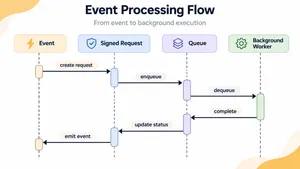
- The provider sends an HTTP POST. The request contains a JSON body describing the event, an event ID, a timestamp and a signature in a header.
- Your endpoint verifies and acknowledges. Your server checks the signature, stores the event and replies with a 2xx status code within a few seconds.
- Your system processes the event. A background worker updates the order, the CRM record or the subscription.
- The provider retries on failure. If your server is down or replies with an error, the provider tries again later. Stripe, for example, retries for up to three days with exponential backoff in live mode.
Webhook vs API vs polling
| API request | Polling | Webhook | |
|---|---|---|---|
| Who starts it | Your system, when it needs data | Your system, on a schedule | The other system, when an event happens |
| Delay | None, at the moment you ask | Up to the polling interval | Usually seconds |
| Requests used | One per question | Many, most of them returning nothing new | One per event |
| Rate limits | Rarely a problem | A common problem as data grows | Rarely a problem |
| What you need to run | A client | A scheduler and a client | A public HTTPS endpoint |
| Main risk | None in particular | Missed changes between polls, throttling | Missed or duplicate deliveries, forged requests |
A webhook and an API usually work together. The webhook tells you that something changed, and an API call fetches the full, current state of the record. Many providers now send only the event type and an ID, and expect you to fetch the details through the API.
What polling costs
Polling looks cheap until it scales. Consider an integration that checks 200 active events on an event platform every five minutes for new registrations.
- Polling: 200 events × 288 checks a day = 57,600 API requests a day, most of which return nothing new, with registrations arriving up to five minutes late.
- Webhooks: one request per actual registration, so 1,500 registrations a day means 1,500 requests, each arriving within seconds.
The figures are illustrative, and the pattern is common. Polling volume grows with the amount of data you watch, while webhook volume grows only with the number of real changes.
When polling is still the right choice
- The provider offers no webhooks.
- Your system cannot expose a public endpoint, for example in a closed network.
- Changes are rare and a delay of minutes or hours does not matter.
- As a safety net. A slow reconciliation poll, once an hour or once a day, catches anything webhooks missed.
How to receive webhooks safely
1. Verify the signature on every request
Anyone who learns your webhook URL can send fake events to it. Providers sign requests so you can tell real ones from forged ones. Stripe, for instance, signs each event with HMAC-SHA256 and sends the result in a Stripe-Signature header, and its libraries reject events whose timestamp is older than five minutes to block replayed requests. Compute the signature over the raw request body, since many frameworks change the body when parsing it, and compare it in constant time. The Stripe webhooks documentation describes the process in detail, and most providers use a similar scheme.
2. Respond fast, process later
Return a 2xx status within a few seconds, then do the work in a background queue. GitHub treats a delivery as failed if your server does not respond within 10 seconds. Slow endpoints cause retries, and retries during an outage can arrive as a flood when the service recovers.
3. Expect duplicates
Providers deliver at least once, not exactly once, so the same event can arrive twice. Store each event ID when you process it and skip any ID you have already handled. This property is called idempotency.
4. Do not rely on order
Events can arrive out of order. An invoice.paid event can arrive before invoice.created. Use the event to trigger a fetch of the current state from the provider's API, rather than applying each event's data blindly.
5. Reconcile on a schedule
Deliveries can fail permanently after the provider's retry window closes. A scheduled job that compares your records with the provider's, once an hour or once a day, catches anything missed. Many app stores and payment providers offer an endpoint that lists recent events for exactly this purpose.
6. Protect the endpoint
Use HTTPS only, exclude the webhook route from CSRF checks that would block it, apply IP allowlists where the provider publishes its addresses, rate-limit the endpoint and rotate signing secrets periodically.
7. Log and monitor deliveries
Record every received event with its ID, type, signature result and processing outcome. Alert when failures rise or when an expected event type stops arriving, which often means the provider disabled your endpoint after repeated failures.
Integrations that keep breaking or hitting rate limits? We replace polling with webhooks, add reconciliation and smoke tests and keep your data in sync.
Explore IT outsourcingSending webhooks from your own product
If your product is the one sending events to customers, the same rules apply in reverse.
- Sign every request with a per-customer secret, and include a timestamp and an event ID.
- Retry with exponential backoff for at least a day, and disable endpoints that keep failing only after notifying the customer.
- Publish an event catalog with the event types, payload examples and a version for each.
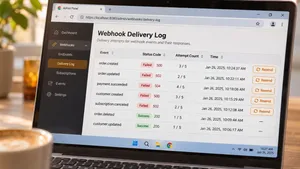
- Show a delivery log in your product, with the status of each attempt and a button to resend, so customers can debug without contacting support.
- Block requests to internal addresses when customers register URLs, so your webhook sender cannot be used to reach your own internal network.
The Standard Webhooks initiative, supported by companies such as Zapier, Twilio, Supabase, Svix and Kong, publishes a common specification for signatures, headers and retries, which saves designing these details from scratch.
Webhooks in delivered integrations
Replacing polling on an event platform
A US media company runs webcast registration across three brands, with single sign-on through Auth0 and event data in Swoogo and ON24. The integration polled Swoogo for changes and repeatedly hit its rate limits. A .wrk team built a Symfony webhook endpoint for Swoogo, with the folders to watch configurable in an admin screen, and kept the old polling as a fallback during the migration. ON24 attendance sync was stabilized, and k6 smoke tests now run after every deployment to the QA, pre-production and production environments, so a broken integration is caught before users notice. The rate-limit incidents stopped. Read the SSO and webcast registration case study.
Server notifications for in-app subscriptions
A Canadian healthcare app sells subscriptions through the App Store and Google Play. During a billing migration to a new Symfony backend, .wrk made store server notifications the primary way to learn about purchases, renewals and cancellations, with a scheduled job as a fallback that checks for anything missed. Read the healthcare platform case study.
Sending call results to a CRM
For a telecom operator running voice AI on its own infrastructure, every analyzed call produces a summary, a quality score and escalation flags. Instead of building a separate dashboard, the platform sends these results to the operator's existing CRM and ticketing system through webhooks, so supervisors work in the tools they already use. Read the on-premise voice AI case study.
Webhook examples by industry
| Industry | Event | What the webhook triggers |
|---|---|---|
| E-commerce | Payment succeeded | Order marked as paid, confirmation email sent, warehouse notified |
| SaaS | Subscription renewed or cancelled | Access updated, invoice stored, account manager alerted |
| Events and media | Registration created, attendance recorded | CRM record updated, follow-up campaign started |
| Software development | Code pushed, pull request opened | Tests run, deployment started, team notified in chat |
| Healthcare | Lab result available | Clinician notified, record updated in the patient system |
| Customer support | Ticket created or escalated | Routing rules applied, AI summary generated |
Webhooks are also how many AI agents and automation tools learn that something happened. Our article on AI workflow automation examples shows how events start automated workflows.
Frequently asked questions
What is a webhook in simple terms?
A webhook is a message one application sends to another automatically when something happens. Instead of your system asking repeatedly whether anything has changed, the other system calls a URL you provide as soon as the event occurs.
What is the difference between a webhook and an API?
With an API, your system sends a request and gets data back when it asks. With a webhook, the other system sends a request to your system when an event happens. Webhooks report that something changed, and APIs are usually used to fetch the full details.
What is a webhook URL?
A webhook URL is the address of an endpoint on your server that receives webhook requests. You register it with the provider, and the provider sends an HTTP POST request to it for each event you subscribed to.
Are webhooks secure?
Webhooks are secure when the receiving endpoint uses HTTPS, verifies the provider's signature on every request, rejects old timestamps to prevent replays and treats the payload as untrusted input. Without signature checks, anyone who knows the URL can send fake events.
What happens if a webhook fails?
Most providers retry failed deliveries with increasing delays for a limited period, which ranges between a few hours and a few days depending on the provider. After that, events can be lost, so receivers should run a regular reconciliation job and monitor for failed or missing deliveries.
To sum up
A webhook is an HTTP request another system sends you when something happens, which makes integrations faster and lighter than polling. Receive webhooks safely by verifying signatures, responding quickly, processing in a queue, ignoring duplicates, fetching current state rather than trusting order and reconciling on a schedule.
.wrk builds and maintains integrations for companies in the US and Europe, connecting payment providers, CRMs, event platforms, app stores and AI systems with webhooks, APIs and the monitoring that keeps them reliable.
Planning an integration or fixing one that keeps failing? Tell us which systems need to talk, and we will propose a design with webhooks, fallbacks and tests.
Explore IT outsourcing