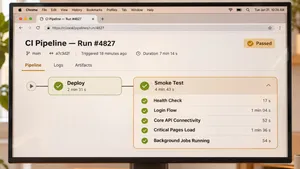
The name comes from hardware: switch the device on and see if it smokes. In software, the equivalent question is whether the release is fit to test further or fit to keep in production. A missing configuration value, an expired API key or a failed database migration can break a release completely while every unit test still passes.
A smoke test should cover the few user journeys and integrations a business cannot run without, finish in minutes, run automatically after every deployment and block or roll back the release when it fails, because its job is to catch total failures early.
This article explains what smoke testing is, how it compares with sanity and regression testing, what to include, how to automate it after each deployment and what a real post-deployment smoke suite caught. It does not cover load testing or full test strategy design.
Key takeaways
- A smoke test checks that a build or release works at the most basic level. It is broad and shallow, not deep.
- Sanity tests check a specific fix or change. Regression tests check that existing features still work in depth.
- Include startup and health checks, sign-in, the one or two journeys that bring in money, key integrations and configuration.
- Keep the suite under about five minutes, so it can run after every deployment to every environment.
- Run it against production too, with test accounts, and connect it to alerts or automatic rollback.
- In a delivered project, k6 smoke tests running after every deployment to QA, pre-production and production catch integration errors before users do.
Smoke, sanity and regression testing compared
| Smoke testing | Sanity testing | Regression testing | |
|---|---|---|---|
| Question | Does the build basically work? | Does this specific change or fix work? | Does everything that worked before still work? |
| Scope | Broad and shallow, across the main functions | Narrow and focused on the change | Broad and deep |
| When | After every build and every deployment | After a bug fix or small change | Before releases and on a schedule |
| Duration | Minutes | Minutes to an hour | Hours, sometimes days |
| Automated? | Almost always | Often manual | Mostly automated, with some manual checks |
| Failure means | Stop: the release is not fit to continue | The change needs more work | A feature broke and needs fixing before release |
Teams sometimes use the terms loosely. What matters is that each kind of test has a clear purpose and a clear owner, and that the fast checks run first.
What to include in a smoke test
| Area | Example checks |
|---|---|
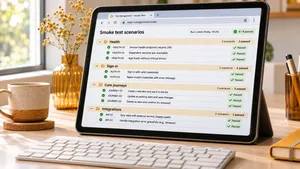
| Startup and health | Every service starts, health endpoints return OK, the application connects to its database and cache |
| Configuration | Environment variables, feature flags and secrets are present, and the release reports the expected version |
| Authentication | A test user can sign in and out, and single sign-on redirects work |
| Core journeys | Search returns results, a test order or registration completes, a key page renders with data |
| Integrations | Payment, email, CRM and identity provider connections respond, using test modes where available |
| Background work | A queued job is picked up and completed, scheduled tasks are registered |
| Data changes | Database migrations ran, and a read and a write succeed |
Leave out edge cases, detailed validation rules and layout checks. Those belong in regression tests. A smoke test that grows to 40 minutes stops being run after every deployment, which defeats its purpose.
How to automate smoke tests after every deployment
- Pick the journeys. List the five to ten actions that would make the product useless or lose money if broken.
- Write them as automated tests. API-level checks are fast and stable. Add one or two browser tests for the most important screens.
- Use dedicated test accounts and data. Create accounts and records that exist in every environment, are clearly marked and never trigger real emails, charges or orders.
- Run after each deployment. Add the suite as a pipeline step that runs against the environment that was just deployed: QA, staging and production.
- Make failure stop the release. In lower environments, a failure blocks promotion. In production, it pages the on-call engineer or triggers an automatic rollback.
- Report clearly. Show which check failed, with the request and response, so the cause is visible in seconds.
- Keep it fast and stable. A smoke test that fails at random teaches people to ignore it. Fix or remove unreliable checks quickly.
Smoke testing in production
Running smoke tests in production finds problems that staging cannot: production configuration, real third-party credentials, DNS and certificates. Use separate test accounts, payment provider test modes where the provider allows them in production, and markers that exclude test traffic from analytics and reports. Many teams also run the same checks every few minutes as synthetic monitoring, which turns the smoke suite into an early warning system between deployments.
Smoke tests with canary releases
When a release goes first to a small share of users or servers, a practice the Google SRE workbook calls canarying, run the smoke suite against the new version before widening the rollout. If it fails, only the canary is rolled back.
Releases breaking things your tests did not catch? We build automated smoke and regression suites that run after every deployment and stop bad releases early.
Explore QA and DevOps servicesA post-deployment smoke suite in practice
A US media company runs webcast registration across three brands. Single sign-on goes through Auth0, event data syncs with Swoogo and ON24, and the sites run on Next.js, WordPress and Symfony. With this many moving parts, a release could pass its own tests and still break registration, because an integration, a template or a configuration value had changed elsewhere.
.wrk added k6 smoke tests to the GitHub Actions pipeline. They run after every deployment to the QA, pre-production and production environments, and they check the registration flow and the integrations behind it. The same work moved password entry to the identity provider's domain, so password managers work across brands, made webcast registration one click for signed-in users and replaced polling of the event platform with webhooks. Integration errors are now caught by the smoke suite before users report them. Read the SSO and webcast registration case study.
For a threat intelligence platform at the same company, integration testing and smoke tests in the CI/CD pipeline run before every production rollout, alongside automated code review. Read the NEXUS case study.
Tools for smoke testing
| Tool | Suited for |
|---|---|
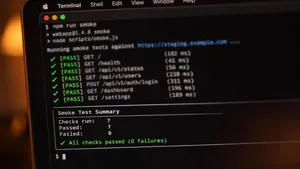
| k6 | API and journey checks written in JavaScript, easy to run in CI, also used for load tests |
| Playwright or Cypress | Browser checks of the most important screens |
| Postman and Newman | Teams that already keep API collections |
| pytest, Jest or PHPUnit | Smoke checks written in the same framework as the rest of the test suite |
| Synthetic monitoring services | Running the same checks every few minutes in production |
Choose tools your team already uses for other tests where possible. The k6 documentation describes a smoke test as the first step before heavier performance tests, which is a useful habit: if the smoke test fails, there is no point running the load test. Our guide to load testing covers the next step.
Common smoke testing mistakes
- Making it too big. A long suite gets skipped or moved to nightly runs, and broken releases slip through.
- Testing only the build, not the deployment. Many failures come from configuration, secrets and infrastructure in the target environment.
- Skipping production. Staging rarely matches production exactly. A short production check catches what staging misses.
- Using real customer accounts. Test data must be separate, clearly marked and safe to repeat.
- Ignoring failures that seem random. Unstable checks hide real failures. Fix or remove them.
- No connection to action. A failed smoke test that nobody sees does not protect users. Connect it to blocking, alerts or rollback.
If your team has inherited a system without tests, our guide to software project rescue explains where smoke tests fit in the first 30 days of a takeover.
Frequently asked questions
What is smoke testing in software testing?
Smoke testing is a quick set of tests that checks whether the most important functions of a build or deployment work, such as starting up, signing in and completing a core action. If the smoke test fails, the build is rejected before deeper testing or release.
What is the difference between smoke testing and sanity testing?
Smoke testing checks the whole build broadly and shallowly to decide whether it is fit for further testing or release. Sanity testing checks a specific change or fix in more detail to confirm it works as intended.
Is smoke testing manual or automated?
It can be either, but modern teams automate it so it runs after every build and deployment. Automated smoke tests finish in minutes and can block a release or trigger a rollback without anyone watching.
When should smoke tests run?
Run smoke tests after every build and after every deployment to each environment, including production. Many teams also run them every few minutes in production as synthetic monitoring.
How long should a smoke test take?
Most smoke suites should finish in under about five minutes. If it takes much longer, move detailed checks into regression tests and keep only the critical paths in the smoke suite.
To sum up
A smoke test answers one question after every build and deployment: does the release basically work? Keep it short, cover the journeys and integrations the business depends on, run it in every environment including production and connect failures to blocking, alerts or rollback.
.wrk builds automated test suites, CI/CD pipelines and monitoring for product companies in the US and Europe, so broken releases are stopped by the pipeline instead of reported by users.
Want every deployment checked automatically? Tell us about your stack and release process, and we will propose a smoke and regression test plan.
Explore QA and DevOps services