
Without either, a business application suffers lost updates: two people open the same order, supplier record or contract, both edit it, and whoever saves last overwrites the other's changes without warning. Often nobody notices until a customer complains, and by then nobody can say who changed what.
Optimistic locking suits most business applications, because conflicts are rare and users should not wait, while pessimistic locking suits short, high-contention operations such as reserving stock or seats, and both work best with a clear conflict message and an audit trail of every change.
This article explains the lost update problem, how optimistic and pessimistic locking work, how to choose between them, how to implement them in databases, ORMs and APIs, how to design the conflict experience for users and how a supply chain platform stopped silent overwrites. It does not cover distributed consensus or real-time collaborative editing algorithms.
Key takeaways
- A lost update happens when two users edit the same data and the later save silently overwrites the earlier one.
- Optimistic locking checks a version number or timestamp when saving and rejects the save if the record changed since it was read.
- Pessimistic locking locks the record when it is read for editing, so others wait or are refused.
- Use optimistic locking for typical business records and forms. Use pessimistic locking, held for milliseconds, for contested resources such as stock counts.
- In HTTP APIs, ETags with If-Match headers carry optimistic locking to clients, and a 412 Precondition Failed response signals a conflict.
- Show users what changed and let them merge or reload. Pair locking with an audit trail, so every change can be traced.
The lost update problem
| Time | User A | User B | Database value |
|---|---|---|---|
| 10:00 | Opens supplier record, status "Active" | Active | |
| 10:01 | Opens the same record, status "Active" | Active | |
| 10:02 | Changes status to "On hold", saves | On hold | |
| 10:03 | Changes contact email, saves the whole form, which still says "Active" | Active, with the new email |
User A's change has disappeared, and the record shows no sign that it ever happened. The same pattern occurs when a background job and a person edit the same record, or when two integrations sync the same object.
How optimistic locking works
- Each record carries a version. A version number, or a last-modified timestamp, is stored with the row.
- Reading returns the version. The edit form or API response includes it.
- Saving checks the version. The update runs only if the version in the database still matches the one the user read, for example with a condition such as "where id equals 42 and version equals 7", and increments it.
- A mismatch means a conflict. If no row was updated, someone else saved first. The application tells the user instead of overwriting.
Optimistic locking holds no locks while users think, type or leave the form open over lunch, so it scales well and never leaves records stuck.
How pessimistic locking works
- Lock on read. The application reads the record with a lock, for example with SELECT ... FOR UPDATE in SQL.
- Others wait or fail. Other transactions that try to lock or change the same row wait until the lock is released, or fail immediately if configured not to wait.
- Release on commit. The lock ends when the transaction commits or rolls back.
Database locks should last milliseconds, inside one transaction. For longer, human-scale editing, some applications use a separate "checked out by" flag with an expiry, but these need careful handling of abandoned locks and are often frustrating for users.
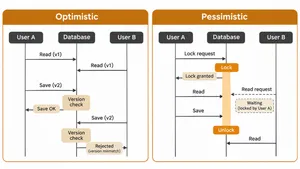
Optimistic vs pessimistic locking compared
| Optimistic locking | Pessimistic locking | |
|---|---|---|
| When it checks | At save time | At read time |
| Waiting | None, conflicts are reported | Others wait or are refused while the lock is held |
| Best when | Conflicts are rare, edits take seconds to minutes | Conflicts are frequent and operations are short |
| Typical uses | Forms, CRM records, orders, content, settings | Stock reservations, seat booking, account balances, job claiming |
| Risks | Users must handle conflicts | Deadlocks, long waits, locks left by crashed processes |
| Works across HTTP requests | Yes, with versions or ETags | Only with application-level checkout flags |
Many applications use both: optimistic locking for records people edit, and short pessimistic locks or atomic updates for counters and reservations.
Implementation options
In the database
For pessimistic locking, PostgreSQL and most relational databases provide row-level locks through SELECT ... FOR UPDATE, with options to skip locked rows or fail without waiting, described in the PostgreSQL documentation on explicit locking. For simple counters, an atomic update such as "set stock to stock minus 1 where stock is above 0" avoids explicit locks entirely.
In ORMs
Most ORMs support optimistic locking with a version field. In Doctrine, used by Symfony applications, marking a field as the version enables automatic checks and raises an exception when a stale entity is saved, and pessimistic locks can be requested when loading entities inside a transaction, as the Doctrine concurrency documentation explains. Hibernate, Entity Framework, ActiveRecord and Django have equivalent features.
In HTTP APIs
APIs carry optimistic locking to clients with conditional requests. The server returns an ETag that identifies the current version of a resource. The client sends it back in an If-Match header when updating. If the resource has changed, the server responds with 412 Precondition Failed instead of applying the update. This protects records edited by mobile apps, integrations and browser clients alike.
For background jobs and integrations
Jobs that update records should read the version, apply their change and save with the same check, retrying from a fresh read when a conflict occurs. Our guide to idempotency covers how to make those retries safe.
Users overwriting each other's changes without knowing? We add locking, conflict handling and audit trails to existing business applications.
Explore IT outsourcingDesigning the conflict experience
A conflict message is only useful if users know what to do next.
- Explain what happened. "This record was changed by Ana at 10:02 while you were editing."
- Show the difference. Display their changes next to the saved version, field by field.
- Offer clear choices. Reload and reapply, keep the other version or merge field by field where it is safe.
- Save only changed fields. Forms that send every field, including unchanged ones, create conflicts and overwrites that field-level saves would avoid.
- Show who else is editing. A simple notice that another person has the record open prevents many conflicts before they happen.
Stopping silent overwrites on a supply chain platform
A B2B supply chain platform, built with Angular and Symfony, lets brokers track relationships between factories and suppliers. Several brokers edited the same records, concurrent edits collided silently, and nobody could tell who had changed what. The platform also lacked automated tests, which made changes to data handling risky.
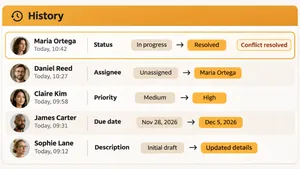
A .wrk team first added Vitest and PHPUnit test suites to every merge request in GitLab CI, so changes to data handling could be made safely. It then integrated the DamienHarper Auditor bundle to record every entity change in the Symfony data layer and built a custom audit view showing the history of each record. The audit trail ended the detective work on conflicting edits, and a new broker dashboard gave users a clearer view of factory and supplier relationships. Read the platform modernization case study.
Locking prevents silent overwrites, and an audit trail shows exactly what happened when they occur. Our guide to audit logs covers how to record changes.
Common mistakes
- Last write wins by default. Most frameworks overwrite silently unless locking is added.
- Sending whole objects on save. Unchanged fields overwrite newer values.
- Holding database locks during user input. Locks held while someone types block everyone else and cause timeouts.
- Ignoring integrations and jobs. Background writers cause many of the conflicts users never see.
- Vague conflict messages. "Error 409" tells users nothing. Show what changed and offer a next step.
- No audit trail. Without history, resolving a conflict means guessing.
Frequently asked questions
What is the difference between optimistic and pessimistic locking?
Optimistic locking lets users edit freely and checks at save time whether the record changed since it was read, rejecting the save if it did. Pessimistic locking locks the record when it is read for editing, so other users wait or are refused until the lock is released.
When should I use optimistic locking?
Use optimistic locking when conflicts are rare and edits take seconds to minutes, as in most business forms, CRM records, orders and content. It avoids waiting and never leaves records locked.
When should I use pessimistic locking?
Use pessimistic locking for short operations on heavily contested data, such as reserving stock, booking seats or claiming jobs from a queue, where conflicts are likely and must not happen.
What is the lost update problem?
The lost update problem happens when two users or processes read the same data, both change it and the later save overwrites the earlier change without anyone noticing.
How do ETags help prevent lost updates?
An ETag identifies the version of a resource. Clients send it back in an If-Match header when updating, and the server applies the change only if the resource is unchanged, otherwise responding with 412 Precondition Failed.
To sum up
Silent overwrites happen in every business application where several people or processes edit the same data. Use optimistic locking with version checks for most records, short pessimistic locks or atomic updates for contested resources, ETags for APIs, clear conflict messages for users and an audit trail so every change can be traced.
.wrk builds and modernizes business applications for companies in the US and Europe, including concurrency control, audit trails and the test coverage that makes changes to data handling safe.
Need to stop lost updates in your application? Tell us how your users and integrations edit data, and we will propose a locking and conflict-handling design.
Explore IT outsourcing