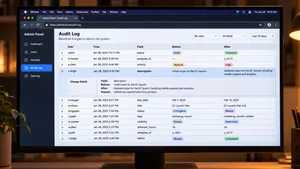
Most applications already write logs, but ordinary application logs answer a different question. They help engineers debug errors, they are rotated after a few days and anyone with server access can change them. When a customer asks who changed their contract or a regulator asks who viewed a patient record, those logs are rarely enough.
A useful audit log records every security-relevant and business-relevant action as a structured event with the actor, action, target, time, source and outcome, stores it where it cannot be quietly edited or deleted and keeps it for as long as the strictest applicable rule requires.
This article explains what an audit log should contain, which events to record, how to store logs so they hold up in an audit, how long to keep them under common regulations and how to build them into an existing application. It does not cover network or operating system logging, and it is not legal advice.
Key takeaways
- An audit log answers six questions for every important action: who, what, which record, when, from where and with what result.
- Audit logs differ from application logs: they are structured, append-only, kept for months or years and readable by people outside engineering.
- Never record passwords, tokens, full card numbers or more personal data than the event needs.
- Make logs tamper-evident with append-only storage, hash chaining or write-once storage, and keep them separate from the systems they describe.
- Retention depends on the rules that apply: PCI DSS requires at least 12 months, SOC 2 audits usually sample a 12-month period, and GDPR requires a defined period no longer than necessary.
- An audit log only helps if people can search it. A simple audit view in the admin panel ends most investigations in minutes.
Audit log, application log and audit trail
| Application log | Audit log | |
|---|---|---|
| Main purpose | Debugging and monitoring | Accountability, investigations and compliance |
| Typical content | Errors, warnings, performance data | User and system actions on data, access and settings |
| Format | Often free text | Structured events with fixed fields |
| Who reads it | Engineers | Security, compliance, support, auditors and sometimes customers |
| Retention | Days or weeks | Months or years |
| Can it change? | Rotated and overwritten | Append-only and protected |
The terms audit log and audit trail are usually used interchangeably. Some teams use audit trail for the full history of a single record, such as every change to one invoice, and audit log for the system-wide stream of events.
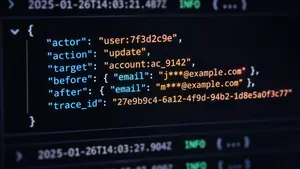
What each audit log entry should contain
| Field | Example | Why it matters |
|---|---|---|
| Event ID | evt_7f3a… | Lets entries be referenced and checked for gaps |
| Timestamp | 2026-11-09T09:14:03.512Z | UTC, from a synchronized clock, with milliseconds |
| Actor | User ID, service account or AI agent ID | Who performed the action, including automated actors |
| Actor context | Role, organization or tenant, impersonation flag | Shows the permissions in effect and whether support staff acted on someone's behalf |
| Action | invoice.updated, user.role_changed | A fixed list of action names makes searching reliable |
| Target | Object type and ID | Which record was affected |
| Changes | Field names with before and after values | What exactly changed, with sensitive values masked |
| Source | IP address, device, application version | Where the action came from |
| Outcome | Success, denied or failed, with a reason | Failed and denied attempts often matter most in an investigation |
| Request or trace ID | req_91c2… | Connects the event to application logs and other systems |
Use a fixed schema and a controlled list of action names from the start. Free-text messages such as "user updated stuff" make logs impossible to search a year later.
Which events to record
- Authentication. Sign-ins, failed sign-ins, password resets, multi-factor changes and sign-outs.
- Authorization. Role and permission changes, access grants and removals, invitations and deactivations.
- Sensitive data access. Viewing, exporting or downloading records that contain personal, health or financial data.
- Data changes. Creation, updates and deletion of business records, with before and after values for the fields that matter.
- Configuration. Changes to settings, integrations, API keys, webhooks and security policies.
- Administrative actions. Impersonation by support staff, bulk operations and data imports.
- Automated actions. Changes made by scheduled jobs, integrations and AI agents, recorded under their own identity.
- Audit log access. Who searched or exported the audit log itself.
Recording every page view usually adds cost without adding value. Focus on actions that change data, change access or expose sensitive information.
What never goes in an audit log
The OWASP Logging Cheat Sheet lists data that should be excluded, removed, masked or hashed before logging. For audit logs, the main items are:
- Passwords, session identifiers, access tokens and API keys.
- Encryption keys and database connection strings.
- Full payment card numbers and bank account details.
- Health data, government identifiers and other sensitive personal data, unless the event requires them and access to the log is restricted accordingly.
- Full document contents. Record that a document was viewed or changed, and which fields, not the whole text.
Masking matters for a second reason. Under GDPR, an audit log containing personal data is itself personal data, so the less it contains, the simpler its retention and access rules become.
How to store audit logs so they hold up
An audit log that an administrator can quietly edit proves little. Four design choices make it trustworthy.
- Append-only writes. The application can add entries but cannot update or delete them. In a database, this means a separate table or schema where the application account has insert rights only.
- Separation from the main system. Ship events to a separate store, such as a dedicated database, a log platform or object storage, under accounts that the application's administrators do not control.
- Tamper evidence. Chain entries by including a hash of the previous entry in each new one, so any change breaks the chain, or write batches to storage with write-once protection. Amazon S3 Object Lock, for example, can prevent objects from being deleted or overwritten for a fixed retention period, even by administrators in its compliance mode.
- Reliable delivery. Write the audit event in the same transaction as the change it describes, or through an outbox table that is shipped afterwards, so a crash cannot leave a change without its record.
Storage cost is rarely the obstacle. A product that records a million events a day at about 1 KB each stores roughly 365 GB a year, which costs a few hundred dollars a year in object storage.
How long to keep audit logs
| Rule or framework | What it says about audit logs | Practical retention |
|---|---|---|
| PCI DSS v4 | Requirement 10 calls for audit logs of access to cardholder data, kept for at least 12 months with the most recent three months immediately available | 12 months, three online |
| HIPAA Security Rule | The audit controls standard requires mechanisms that record and examine activity in systems containing electronic health information. It sets no specific log retention period, while required documentation is kept for six years | Many organizations keep audit logs for six years |
| SOC 2 | Auditors test logging and monitoring controls and sample evidence across the observation period, usually 12 months | At least 12 months |
| GDPR | No fixed period. The storage limitation principle requires keeping personal data no longer than necessary for its purpose | A defined, documented period, often 1–2 years for security logs |
| EU AI Act | Providers and deployers of high-risk AI systems must keep automatically generated logs for at least six months, unless other law requires otherwise | At least six months for those systems |
When several rules apply, the longest required period sets the minimum, and GDPR sets the obligation to justify it. Write the retention period for each log type into a policy, automate deletion when it expires and record that deletion happened.
Building audit logs into an existing application
| Approach | How it works | Strengths | Limits |
|---|---|---|---|
| ORM or framework listeners | Hooks in the data layer capture every change to tracked entities | Covers all changes made through the application with little code | Misses changes made directly in the database or by other services |
| Database triggers | Triggers write to an audit table on insert, update and delete | Catches every change, whatever the source | Knows little about the user or the reason unless the application passes it in |
| Explicit domain events | The application emits named events such as contract.approved | Clear business meaning, easy to search | Requires discipline to add events everywhere they are needed |
| Change data capture | A tool reads the database's change stream and ships it to a log store | No changes to application code, low impact on performance | Records data changes, not who requested them or why |
Most teams combine two approaches: data-layer listeners or change data capture for completeness, plus explicit events for important business actions such as approvals, exports and permission changes.
Need to answer who changed what, and prove it to an auditor? We add audit trails, retention rules and audit views to existing applications.
Explore IT outsourcingAudit logs in delivered projects
Ending detective work on conflicting edits
A B2B supply chain platform, built on Angular and Symfony, lets brokers track relationships between factories and suppliers. Several people edited the same records, changes collided silently and nobody could say who had changed what. A .wrk team added the DamienHarper Auditor bundle to record entity changes in the Symfony data layer, then built a custom audit view where users see the history of each record. Disputes about conflicting edits are now settled by looking at the record's history. Read the platform modernization case study.
Audit-ready results for clinical alerts
A Canadian healthcare startup needed automated alerts when patient-entered data suggested serious complications, across hundreds of thousands of records a month. The queue-based alert engine .wrk built supports 30+ configurable alert types and stores every result in an audit-friendly form, alongside code review gates, role-based approvals and penetration testing that supported SOC 2 Type 2 certification. Read the healthcare platform case study.
History you can query for a data pipeline
For a threat intelligence platform, a .wrk team stored security events as a graph with temporal versioning and a processing ledger, so earlier versions of each vendor, product and vulnerability entry stay available and every processed item is recorded. Read the NEXUS case study.
Audit logs for AI agents
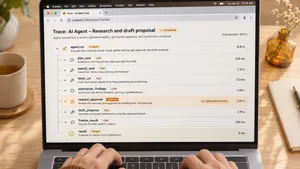
AI agents that act in business systems need the same accountability as people, and a little more. Record each agent under its own identity, and log the request that triggered it, the tools it called with their parameters, approvals given by people and the final result. Keep a trace ID that links all steps of one task. When something goes wrong, this record is the only way to tell whether the agent misread its input, used a tool in the wrong way or acted on an approval it should not have received. Our guide to AI agent security covers the related controls.
Make the audit log usable
- An audit view in the admin panel. Filters by user, record, action and date, with before and after values side by side, answer most questions without engineering help.
- Per-record history. A history tab on important records, such as contracts, orders or patient files, is often the feature customers value most.
- Export for auditors. A filtered export with the event fields and a note on how integrity is protected saves days during audits.
- Alerts on sensitive events. Role changes to administrator, bulk exports and repeated denied access attempts should notify someone.
- Regular review. A short monthly review of sensitive events catches problems that alerts miss. Our guide to SOC 2 for startups shows how auditors use this evidence.
Frequently asked questions
What is an audit log?
An audit log is a chronological, tamper-resistant record of actions in a software system, showing who did what, to which record, when, from where and with what result. It is used for investigations, dispute resolution and compliance.
What is the difference between an audit log and an audit trail?
The terms are usually interchangeable. When teams distinguish them, the audit log is the system-wide stream of events, and the audit trail is the full history of changes to one record or process.
What should an audit log include?
Each entry should include an event ID, a UTC timestamp, the actor and their role, the action, the affected record, the changed fields with before and after values, the source of the request, the outcome and a request or trace ID.
How long should audit logs be kept under GDPR?
GDPR sets no fixed period. Keep audit logs containing personal data only as long as needed for their purpose, define the period in a policy, and delete them automatically when it expires. Many organizations use one to two years for security logs, or longer when another rule, such as PCI DSS or a sector regulation, requires it.
How do you make audit logs tamper-proof?
Write logs to append-only storage that the application's administrators cannot modify, chain entries with hashes so any change is detectable, use write-once storage with a retention lock for archived logs, and restrict and record access to the logs themselves.
To sum up
A useful audit log records important actions as structured events, leaves out secrets and unnecessary personal data, stores entries where they cannot be quietly changed and keeps them for as long as the strictest applicable rule requires. Build it into the data layer, add explicit events for key business actions and give people a simple way to search it.
.wrk builds and modernizes business applications for companies in the US and Europe, including audit trails, permission models and compliance features for healthcare, legal and enterprise platforms.
Preparing for an audit or a customer security review? Tell us about your application, and we will propose an audit logging design with retention rules and an audit view.
Explore IT outsourcing