In many African markets, mobile money is how people pay, and card checkout alone shuts out a large share of customers. Integrating mobile money looks simple in the documentation: send a payment request, receive a result. In production, payments sit in a pending state while the customer finds their phone, callbacks do not always arrive and every country has its own onboarding.
A reliable mobile money integration treats every payment as an asynchronous process with a unique reference, waits for a final status through callbacks and polling, never assumes a timeout means failure, and reconciles every day against the operator's records.
This article explains how mobile money payments work, how the MTN MoMo API is structured, how to integrate it step by step, the engineering lessons that matter in production and how .wrk built an MTN payment SDK for a Nigerian education app. It does not cover card payments or bank transfers.
Key takeaways
- Mobile money accounted for over $2 trillion in transactions in 2025, with 2.3 billion registered accounts worldwide, according to the GSMA.
- A MoMo collection works as a request to pay: your server sends the request, the customer approves on their phone and the payment starts as pending and ends with a final status.
- Every request needs a unique reference ID, which doubles as protection against duplicate charges.
- Use callbacks for speed and status polling as a fallback. A timeout means "unknown", not "failed".
- Onboarding, credentials and currencies differ by country, so plan go-live per market.
- For PrepClass in Nigeria, .wrk built an MTN payment SDK with the operator's support, inside a four-week MVP that reached 15,000 active users in two weeks.
Why mobile money matters
The GSMA's State of the Industry Report on Mobile Money 2026 found that over $2 trillion moved through mobile money accounts in 2025. Registered accounts reached 2.3 billion, and 593 million were active in a typical 30-day period, with most new registered and active accounts coming from sub-Saharan Africa.
For a product team, these numbers mean that in many markets, a checkout without mobile money excludes the customers most likely to use the product. Students paying for exam practice, small shops paying suppliers and families paying for school fees often have a mobile money wallet long before they have a card.
How a mobile money payment works
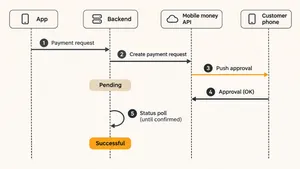
- The customer chooses mobile money at checkout and enters or confirms their phone number.
- Your server sends a request to pay to the operator's API, with the amount, currency, phone number and a unique reference ID.
- The operator accepts the request and returns a response saying it is being processed. No money has moved yet.
- The customer gets a prompt on their phone, through the wallet app or a USSD menu, and approves it with their PIN.
- The operator completes or rejects the payment, for example if the customer declines, has insufficient funds or does not respond in time.
- Your server learns the result through a callback to your URL, by checking the payment status with the reference ID, or both.
- Your product grants access or confirms the order only when the status is final and successful.
The MTN MoMo API at a glance
MTN's MoMo developer portal offers a sandbox and documentation for its Open API, organized into products.
| Product | What it does | Typical use |
|---|---|---|
| Collections | Requests payments from customers' wallets | Checkout, subscriptions, bill payments |
| Disbursements | Sends money to customers' wallets | Refunds, payouts, cashback, salaries |
| Remittance | Sends money across borders | International transfers |
Each product has its own subscription key in the developer portal. In the sandbox, you create an API user and API key, exchange them for an access token and send requests with an X-Target-Environment header that identifies the environment. A request to pay uses a UUID in the X-Reference-Id header, and the collection API documentation shows that the API returns 202 Accepted while the payer has not yet approved, and 409 Conflict if the same reference ID is used twice. The status stays PENDING until the payer approves, declines or the request expires.
Integration step by step
- Register on the developer portal and subscribe to the products you need, usually Collections first.
- Build against the sandbox. Create the API user and key, request tokens, send requests to pay and check statuses with test numbers.
- Design the payment record. Store each payment with your internal order ID, the reference ID you sent, amount, currency, phone number, status and timestamps.
- Handle callbacks. Expose an HTTPS endpoint for the callback URL, verify that each callback matches a payment you created and update the record.
- Add status polling. For payments still pending after a short time, check the status with the reference ID on a schedule until it is final or expired.
- Build the customer experience. Tell customers to check their phone and approve the payment, show the pending state clearly and offer a retry after expiry.
- Reconcile daily. Compare your records with the operator's transaction reports and resolve any payment that differs.
- Go live per country. Complete the operator's business onboarding, receive production credentials and settings for each market and test with small real payments.
Engineering lessons for production
A timeout is not a failure
If your request to the operator times out, the payment may still be processing. Marking it as failed and asking the customer to pay again can charge them twice. Treat a timeout as unknown, keep the reference ID and check the status before doing anything else.
Use the reference ID for idempotency
The reference ID you send identifies the payment. Generate it once per payment attempt, store it before sending the request and reuse it for status checks. If the same reference is sent twice, the operator rejects the duplicate. Our guide to idempotency explains why this matters for every payment API.
Callbacks help, polling decides
Callbacks give fast results, but they can be delayed or never arrive. Combine them with polling, and treat the status API as the final word. Our guide to webhooks covers the same pattern for other providers.
Normalize phone numbers
Customers type numbers with and without country codes, spaces and leading zeros. Store numbers in international format and validate them before sending a request, or many payments fail before they start.
Design for the waiting time
The customer must switch to their phone and approve the payment. Show clear instructions, keep the checkout page waiting with a visible status and handle the case where the customer approves after leaving the page.
Plan per market
Currencies, limits, onboarding requirements and production settings differ by country. The sandbox uses a test currency, so test currency handling separately before each market goes live.
Consider an aggregator
Payment aggregators combine several mobile money operators and card networks behind one API. They speed up multi-country launches and add fees. Direct integration gives more control and lower fees in a single market.
Launching a product in African markets? We integrate mobile money and local payment methods into your web and mobile apps, with reconciliation and monitoring.
Explore startup developmentA real build: MTN payments for an education app in Nigeria
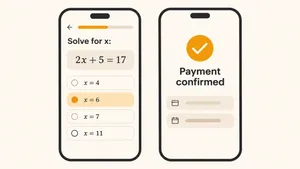
PrepClass connects Nigerian students with tutors for exam preparation. It needed an MVP in four weeks on a tight budget: a React Native mobile app and an admin site, practice questions full of math formulas and payments through MTN mobile money, which was mandatory for its market.
Two pieces did not exist. There was no LaTeX renderer for React Native, and MTN had no SDK for the stack, with sparse documentation to work from.
- Custom formula rendering. .wrk built a LaTeX formula module for React Native and a matching WYSIWYG plugin for the admin site, so tutors could write formulas and students could see them on their phones.
- An MTN payment SDK. The team worked through the MTN payment API with the operator's support and released a reusable SDK that other projects can use.
- Fast delivery. After scope sign-off, the functional app and admin site were ready in three weeks. Phase two added courses, analytics, questions and answers and the payment integration.
The MVP launched on time and on budget, reached 15,000 active users with a 4.8 rating within two weeks, and helped PrepClass secure funding for its next phase. Read the PrepClass case study.
What a mobile money integration costs
For one operator in one market, a direct integration with requests to pay, callbacks, polling, reconciliation and an admin view usually takes three to six weeks of backend and front-end work, roughly $10,000–$30,000 at Central European rates. Each additional operator or market adds less, because the payment record, reconciliation and customer flow are reused. Business onboarding with the operator runs in parallel and can take longer than the engineering. For early-stage products, our article on MVP development cost shows how payment work fits into a first-release budget.
Frequently asked questions
What is a mobile money API?
A mobile money API lets an app or website request payments and send money through customers' mobile money wallets. The customer approves each payment on their phone, and the business receives the result through callbacks or status checks.
How does the MTN MoMo API work?
Your server requests a payment with the amount, currency, the customer's phone number and a unique reference ID. MTN sends the customer an approval prompt, and the payment stays pending until they approve or decline. Your server then receives the final status by callback or by checking the reference ID.
How do I get MTN MoMo API credentials?
Register on MTN's MoMo developer portal, subscribe to the products you need and generate sandbox credentials. Production credentials come after business onboarding with MTN in each country where you want to accept payments.
What does a pending status mean in mobile money?
Pending means the operator accepted the payment request but the customer has not yet approved or declined it, or the payment has not finished processing. Do not treat a pending or timed-out payment as failed. Check the status again until it is final.
Should I integrate mobile money directly or through an aggregator?
Integrate directly when you serve one market and want the lowest fees and the most control. Use an aggregator when you need several operators or countries quickly and accept higher fees in exchange for one integration.
To sum up
Mobile money integration works when every payment is treated as an asynchronous process with a unique reference, final status comes from callbacks backed by polling, timeouts are treated as unknown and every day ends with reconciliation. Plan onboarding per market early, since it often takes longer than the code.
.wrk builds web and mobile products for startups and established companies in the US, Europe and beyond, including payment integrations with mobile money operators, app stores and card providers.
Need mobile money in your product? Tell us which markets and operators you need, and we will propose an integration plan and timeline.
Explore startup development