
Remote monitoring and patient-reported data give care teams far more information than they can read, and somewhere in thousands of daily entries is the one that should prompt a call. Software can find it. The hard part is making alerts specific enough that clinicians act on them.
A clinical alert system earns clinicians' trust when its criteria are defined and owned by clinicians, every alert is specific, actionable and routed to a named role, duplicate and low-value alerts are suppressed, and every decision the system makes is stored in an auditable form.
This article explains how clinical alert systems work, how to design alert criteria with clinicians, how to prevent alert fatigue, the architecture behind it, the regulatory questions to ask and how a healthcare platform built one. It does not cover bedside device alarms in hospitals, and it is not medical or regulatory advice.
Key takeaways
- A clinical alert system turns patient data into specific, routed notifications based on criteria clinicians define.
- Criteria can use thresholds, trends, combinations of answers and missing data. Each needs a clinical owner and a written rationale.
- Alert fatigue is the main failure mode. Suppress duplicates, group related alerts and track how often each alert type leads to action.
- Run the engine on a queue, so analysis never slows the patient-facing app and every record is processed at least once.
- Store every evaluation, alert, acknowledgment and outcome. Auditors, clinicians and insurers will ask.
- Check early whether your alerts make the software a regulated medical device. The FDA updated its clinical decision support guidance in January 2026.
How a clinical alert system works
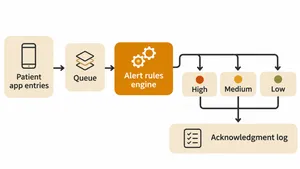
- Data arrives. Patients enter symptoms or answers in an app, or devices send readings.
- Records enter a queue. The app stores the data and places an evaluation job in a queue, so the patient sees no delay.
- Criteria are evaluated. Workers check the new data, often together with recent history, against the active alert rules.
- Alerts are created. When criteria match, the system creates an alert with a type, a severity and the data that triggered it.
- Alerts are routed. Each alert goes to the role responsible, such as a care coordinator, a nurse or a physician, through the channel agreed for that severity.
- Someone acknowledges and acts. The recipient reviews the alert, records the action taken and closes it, or it escalates if nobody responds in time.
- Everything is recorded. The evaluation, the alert, every notification and the outcome are stored for review and audit.
Designing alert criteria with clinicians
| Criterion type | Example | Watch out for |
|---|---|---|
| Threshold | A pain score of 9 or 10 out of 10 | Patients whose baseline is already high |
| Trend | A pain score that rose by 3 points over 5 days | Short gaps in data that distort trends |
| Combination | High pain plus a new fever plus reduced mobility | Too many conditions make the rule rarely fire |
| Specific answer | A "yes" to a question about new numbness or weakness | Wording of the question in the app |
| Missing data | No entries for 7 days from a patient who usually reports daily | Holidays and app problems |
| Change from baseline | A reading well outside the patient's own normal range | Needs enough history to define a baseline |
Run criteria workshops with the clinicians who will receive the alerts. For each criterion, write down who owns it, why it exists, what action it should trigger and how urgent it is. Then test the draft criteria against historical data before going live: how many alerts would each rule have produced last month, and would clinicians have acted on them?
Preventing alert fatigue
When most alerts lead nowhere, clinicians start dismissing them without reading, and the important one gets lost. Design against this from the start.
- Make every alert actionable. If nobody knows what to do with an alert type, remove or rewrite it.
- Use severity tiers. Urgent alerts interrupt. Lower tiers go to a work queue reviewed at set times.
- Suppress repeats. Do not alert again for the same patient and condition within a defined window unless it gets worse.
- Group related alerts. Several criteria firing for one patient on one day should appear as one item.
- Route to a role, not a crowd. Sending every alert to everyone guarantees that nobody owns it.
- Measure what happens. Track, for each alert type, how often it is acknowledged, how quickly and how often it leads to an action. Review alert types with low action rates every month with the clinical owners.
Building patient monitoring or alerting into your product? We design alert engines with clinicians, with queues, audit trails and the security healthcare data needs.
Explore healthcare softwareThe architecture of a reliable alert engine
- Queue-based processing. Evaluation runs in background workers fed by a message queue, so peaks in patient activity never slow the app and work is never lost when a worker restarts.
- At-least-once processing with idempotency. A record may be evaluated twice after a failure, so alert creation must check whether the same alert already exists. Our guide to idempotency explains the pattern.
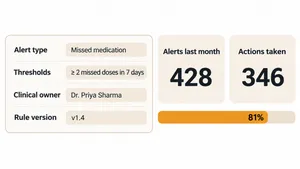
- Configurable criteria. Rules live in configuration, with versions, so clinical owners can change thresholds without a software release, and every alert records which rule version produced it.
- Failure handling. Records that repeatedly fail evaluation go to a dead letter queue and alert the engineering team, since a silent failure in an alert system is a patient safety problem.
- Audit-ready storage. Each evaluation and its result, each alert, each notification and each acknowledgment are stored in a form that can be searched and exported. Our guide to audit logs covers what to record.
- Security. Patient data stays encrypted, access follows roles, and every view of an alert is logged, in line with HIPAA in the US and PIPEDA in Canada.
Regulatory questions to ask early
Whether alerting software is regulated depends on what it does and who uses it. In the US, the FDA's clinical decision support software guidance, updated in January 2026, explains which functions are excluded from the definition of a medical device, using criteria set in the Federal Food, Drug, and Cosmetic Act. Questions that usually matter include whether the software analyzes medical images or signals, whether it supports a healthcare professional or speaks directly to patients and whether the professional can independently review the basis for each recommendation. Other countries have their own rules for software as a medical device. Get regulatory advice before launch, and design alerts so clinicians can always see the data and rule that produced them.
A real alert engine across hundreds of thousands of records a month
A Canadian healthcare startup, working with .wrk under NDA, lets patients track chronic pain and share their data with clinicians and insurers. Clinicians needed automated alerts when patient-entered data suggested serious complications, across hundreds of thousands of records a month, without slowing the app.
The .wrk team, which has worked with the company for over five years, built the engine with the clinical team.
- Criteria workshops with clinical stakeholders defined what each alert should detect and who should receive it.
- A queue-based engine designed for at-least-once processing, so the app stays fast and no record is skipped.
- Configurable clinical criteria covering 30+ alert types.
- Audit-friendly result storage, so every result can be reviewed later.
- HIPAA and PIPEDA-aligned workflows, with code review gates, role-based approvals and third-party penetration testing, alongside the platform's SOC 2 Type 2 certification.
The alert system was adopted by medical organizations and insurers. Over the same engagement, API calls became about five times faster and monthly outages stopped after the infrastructure upgrade. Read the healthcare platform case study.
Validating and monitoring the system
- Before launch, replay historical data through the rules and review a sample of the resulting alerts with clinicians.
- At launch, run new rules in a silent mode that records alerts without sending them, then compare them with what clinicians would have wanted.
- In operation, track alert volume per type, time to acknowledgment, action rates and missed escalations, and review them with clinical owners monthly.
- After changes, record every rule change with its reason, owner and date, and watch the affected alert types closely for a few weeks.
For the wider security and compliance work around a healthcare platform, see our guides to SOC 2 for startups and healthcare app development cost.
Frequently asked questions
What is a clinical alert system?
A clinical alert system checks patient data against criteria defined by clinicians and notifies the right care team member when a result may need attention. It records each alert, who received it and what action was taken.
What causes alert fatigue?
Alert fatigue happens when clinicians receive many alerts that do not need action, so they start ignoring or dismissing them. Common causes are broad criteria, repeated alerts for the same issue, alerts sent to too many people and alerts without a clear action.
How do you reduce alert fatigue in healthcare software?
Make every alert actionable, use severity tiers, suppress repeats within a time window, group related alerts, route each alert to one responsible role and review action rates per alert type with clinicians every month.
Is a patient alert system a medical device?
It can be, depending on what it does, who uses it and the country. In the US, the FDA's clinical decision support guidance explains which functions are excluded from the device definition. Get regulatory advice before launch.
How should alert criteria be maintained?
Keep criteria in versioned configuration with a clinical owner for each rule, record every change with its reason and date, test changes against historical data and monitor affected alert types after each change.
To sum up
A clinical alert system helps only if clinicians trust it. Define criteria with the people who receive the alerts, make each alert specific and routed to one role, suppress noise, process data on a reliable queue, store every decision for audit and check regulatory status before launch.
.wrk builds healthcare software for companies in the US, Canada and Europe, including patient alert engines, secure data platforms and the compliance work that HIPAA, PIPEDA and SOC 2 require.
Planning patient alerts or remote monitoring? Tell us about your data and care workflow, and we will propose an alert engine design and rollout plan.
Explore healthcare software