
Every system that processes queued messages eventually meets a message it cannot handle: a malformed payload, a reference to a record that no longer exists, a schema change nobody announced or a downstream service that is down for hours. Without a plan, that message is retried forever, blocks the messages behind it or disappears quietly. Each outcome costs money or data.
A dead letter queue turns failed messages into a manageable work list, provided that the team separates temporary errors from permanent ones, alerts on every new dead letter, keeps enough context to diagnose each message and makes processing safe to repeat before replaying anything.
This article explains how dead letter queues work, what ends up in them, how the main platforms implement them, how to design retries and how to operate a DLQ day to day, with a production pipeline as the example. It does not cover choosing a message broker.
Key takeaways
- A dead letter queue holds messages that failed processing after a set number of attempts, so they do not block or loop in the main queue.
- Retry temporary errors, such as timeouts and rate limits, with increasing delays. Send permanent errors, such as invalid data, to the DLQ quickly.
- Keep context with each dead letter: the error, attempt count, timestamps, the original queue and a trace ID.
- Alert on every new dead letter. A DLQ nobody watches is a slower way to lose data.
- Fix the cause before replaying, and make consumers idempotent so replayed messages do not create duplicates.
- In a delivered intelligence pipeline, a DLQ with a processing ledger kept one bad source from stalling hundreds of others.
How a dead letter queue works
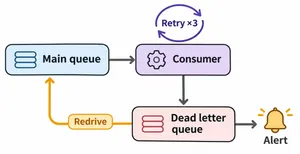
- A consumer takes a message off the main queue and tries to process it.
- Processing fails, and the message returns to the queue or is scheduled for a retry.
- The broker counts the attempts. Each delivery increments a counter, such as the receive count in Amazon SQS.
- The limit is reached. After the configured number of attempts, the broker moves the message to the dead letter queue instead of delivering it again.
- An alert fires. Monitoring sees the DLQ grow and notifies the owner.
- Someone investigates, fixes the code, the data or the dependency, and replays the message to the main queue.
What ends up in a dead letter queue
| Cause | Example | Temporary or permanent |
|---|---|---|
| Malformed message | Invalid JSON, missing required fields | Permanent |
| Schema change | A producer renamed a field and the consumer was not updated | Permanent until the consumer is fixed |
| Missing reference | An event refers to a customer or order that was deleted | Usually permanent |
| Business rule rejection | An order for a product that no longer exists | Permanent |
| Downstream outage | A CRM, payment provider or database is unavailable | Temporary |
| Rate limiting | A third-party API returns "too many requests" | Temporary |
| Timeout | Processing takes longer than the visibility timeout | Often temporary, sometimes a bug |
| Code bug | An unhandled edge case throws an exception | Permanent until the code is fixed |
The distinction drives the design. Temporary errors deserve retries with delays, because the same message will succeed later. Permanent errors deserve the DLQ quickly, because retrying them only wastes capacity and delays everything else.
Dead letter queues by platform
| Platform | How dead lettering works |
|---|---|
| Amazon SQS | A redrive policy names the DLQ and a maximum receive count. After that many receives without deletion, SQS moves the message. Messages can be redriven back to the source queue |
| RabbitMQ | A dead letter exchange receives messages that consumers reject without requeueing, messages whose time to live expires, messages dropped when a queue exceeds its length limit and, for quorum queues, messages delivered more times than their delivery limit |
| Apache Kafka | Brokers have no built-in DLQ. Consumers or frameworks publish failed records to a separate topic, and Kafka Connect supports a dead letter topic for sink connectors, for records that fail conversion or transformation |
| Azure Service Bus | Each queue and subscription has a built-in dead letter subqueue. Messages move there after exceeding the maximum delivery count, which defaults to 10 |
| Google Cloud Pub/Sub | A subscription can name a dead letter topic and a maximum number of delivery attempts between 5 and 100 |
Two details from the Amazon SQS documentation catch many teams out. Setting the maximum receive count to 1 sends a message to the DLQ after a single failure, which leaves no room for temporary errors. And for standard queues, a message keeps its original enqueue time when it moves to the DLQ, so the DLQ's retention period must be longer than the source queue's, or messages can expire before anyone looks at them. In RabbitMQ, as its dead lettering guide notes, messages are silently dropped if the configured dead letter exchange does not exist.
Designing retries before the DLQ
A good retry design has three layers.
- Immediate retries. One or two quick retries inside the consumer handle brief network errors.
- Delayed retries. Further attempts wait longer each time, for example 30 seconds, 2 minutes, 10 minutes and 1 hour, with some random variation so many messages do not retry at the same instant. This covers outages and rate limits.
- Dead lettering. After the last delayed retry, or immediately for errors known to be permanent, the message goes to the DLQ.
Classify errors in code. A validation error should never be retried five times, and a timeout should not go straight to the DLQ. Many teams keep a short list of exception types that skip retries and go directly to dead lettering.
Keep the retry window shorter than the time the business can wait. If an order must be confirmed within an hour, a retry schedule that runs for six hours hides a problem the business needed to know about.
Operating a dead letter queue
Alert on arrival
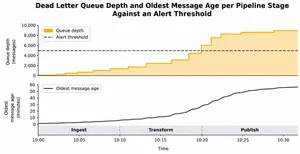
Set an alert on the DLQ's message count, so the owner hears about the first dead letter, not the ten-thousandth. Add a second alert on the age of the oldest message, so nothing sits forgotten.
Keep the context
A dead letter without context is a puzzle. Store or attach:
- The error message and type from the last attempt.
- The number of attempts and the time of each.
- The original queue or topic, and the consumer version that failed.
- A trace or correlation ID that links the message to logs.
- The original payload, unchanged.
Triage with a runbook
- Group dead letters by error type. Fifty messages with the same error are one problem.
- Decide whether the cause is the message, the code or a dependency.
- Fix the cause: deploy a code fix, correct the data or wait for the dependency.
- Replay a small sample and confirm it succeeds.
- Replay the rest, and record what happened.
Replay safely
Replayed messages may have been partly processed before they failed. Consumers must be idempotent, recognizing messages they already handled and skipping the parts already done. Our guide to idempotency explains how.
Decide on ordering
If your consumers rely on message order, moving one message aside and replaying it later can break that order. Either design consumers to handle out-of-order messages, for example by checking versions or timestamps, or pause the affected stream until the failed message is resolved.
Give it an owner and a retention period
Every DLQ needs a named team that watches it, and a retention period that leaves time to investigate. Messages that contain personal data follow the same retention and access rules as the rest of the system.
Messages failing silently or queues backing up? We design retry policies, dead letter handling and monitoring that keep your pipelines moving.
Explore IT outsourcingA production pipeline with dead lettering
A US cybersecurity media company needed a platform that collects news and advisories from hundreds of open sources, extracts entities with language models and stores them as a graph of vendors, products and security events. Some sources block automated access and return empty pages, and every external call can fail. The message queue delivered at least once, so the same item could arrive twice.
A .wrk team of six to eight engineers designed the pipeline to absorb these failures.
- Dead letter queue. Items that keep failing are moved aside, so one problematic source cannot block the rest.
- Processing ledger. Each item's processing state is recorded, so retries and replays skip work already done.
- Fallback for protected sources. When ordinary requests return empty content, a browser-based fetch with Playwright retrieves the page.
- Rate limits per source. Token-bucket limits keep the pipeline from overwhelming sources and triggering blocks.
- Metrics on every stage. Prometheus metrics cover scraping, language model latency and each pipeline step, so failure rates and queue sizes are visible on dashboards.
The MVP launched on schedule and processes heterogeneous sources reliably. Read the NEXUS case study.
Queues sit at the center of other .wrk systems too. A Canadian healthcare platform runs a queue-based alert engine designed for at-least-once processing across hundreds of thousands of patient records a month, and a telecom operator's voice AI platform passes call events between components over a Kafka event bus, so a slow component does not block calls. Read the healthcare platform case study and the on-premise voice AI case study.
Common dead letter queue mistakes
- No alert. Messages accumulate for weeks, and the data they carried is lost in practice.
- Retrying permanent errors. Invalid messages consume retries and delay healthy ones.
- Sending temporary errors straight to the DLQ. A short outage turns into a manual replay job.
- Losing the error. Without the reason for failure, every dead letter has to be debugged from scratch.
- Replaying before fixing. The same messages fail again and return to the DLQ.
- Replaying without idempotency. Partly processed messages create duplicates.
- Short retention. Messages expire before anyone investigates.
For webhook-based integrations, the same ideas apply on the receiving side. Our guide to webhooks covers retries, duplicates and reconciliation.
Frequently asked questions
What is a dead letter queue?
A dead letter queue is a separate queue that holds messages a system could not process after a set number of attempts. It keeps failing messages from blocking the main queue and lets a team inspect, fix and replay them.
Why are messages sent to a dead letter queue?
Messages are dead lettered when processing keeps failing, for example because the message is malformed, refers to data that no longer exists, breaks a business rule or depends on a service that stays unavailable. Some brokers also dead letter messages that expire or overflow a queue's length limit.
What is the difference between a retry queue and a dead letter queue?
A retry queue holds messages that will be tried again automatically after a delay. A dead letter queue holds messages that have used up their retries or failed permanently, and they wait there for a person or a separate process to act.
Does Kafka have a dead letter queue?
Kafka brokers do not have a built-in dead letter queue. Applications and frameworks publish failed records to a separate topic, often called a dead letter topic, and Kafka Connect can do this automatically in sink connectors for records that fail conversion or transformation.
How do you reprocess messages from a dead letter queue?
Fix the cause first, replay a small sample to confirm it works, then move the remaining messages back to the source queue. Amazon SQS provides a built-in redrive for this, and other brokers use a script or a consumer that republishes the messages. Consumers should be idempotent so replays do not create duplicates.
To sum up
A dead letter queue gives failed messages a safe place to wait instead of blocking the queue or disappearing. Retry temporary errors with delays, dead letter permanent ones quickly, keep the context of every failure, alert on arrival and replay only after the cause is fixed and consumers are safe to run twice.
.wrk builds message-driven systems, integrations and data pipelines for companies in the US and Europe, with retries, dead letter handling and monitoring designed in from the start.
Building a pipeline that has to handle failures gracefully? Tell us what it processes, and we will propose a retry and dead letter design with monitoring.
Explore IT outsourcing