
SSO inside one domain is a solved problem. SSO across several brands on different domains, such as a media group with three publications or a software company with several products, is where teams run into trouble. Browsers block the cookies that silent sign-in used to depend on, password managers save a different credential on every site, logging out of one brand leaves the user signed in elsewhere, and existing accounts on each brand need to be merged.
Cross-domain single sign-on works reliably when every brand redirects users to one identity provider on its own domain, credentials are only ever entered there, each brand keeps its own first-party session, and the design avoids depending on third-party cookies.
This article explains how SSO works, which protocols to use, the specific problems of SSO across domains, a reference design, how to roll it out and a real three-brand case. It does not cover workforce SSO for internal employee tools.
Key takeaways
- In SSO, an identity provider authenticates the user, and each website or app trusts its tokens instead of running its own login.
- Use OpenID Connect for customer-facing products. Offer SAML 2.0 as well if business customers want to connect their own corporate identity systems.
- Safari and Firefox block third-party cookies by default, so silent sign-in through hidden iframes fails for many users. Use top-level redirects and first-party sessions.
- Put the identity provider on its own branded domain, such as login.example.com, and collect passwords only there, so password managers store one credential.
- Plan logout, account merging and consent per brand before launch.
- In a delivered project, moving password entry to the identity provider's domain made password managers work across three media brands and cut repeat webcast registration to one click.
How single sign-on works
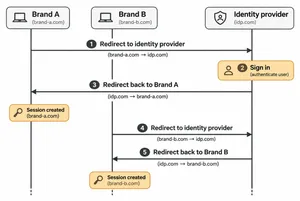
- The user visits Brand A and clicks Sign in.
- Brand A redirects to the identity provider, for example login.example.com, with a request for authentication.
- The user signs in once on the identity provider's page, and the identity provider sets its own session cookie.
- The identity provider redirects back to Brand A with a code, which Brand A exchanges for tokens and creates its own session.
- The user visits Brand B and clicks Sign in, or Brand B checks automatically.
- Brand B redirects to the identity provider, which recognizes its own session and sends the user straight back, signed in, without asking for a password again.
The identity provider's session is what makes the second sign-in instant. Each brand still keeps its own session cookie on its own domain.
SSO protocols compared
| Protocol | What it is | Best for |
|---|---|---|
| OpenID Connect (OIDC) | An identity layer on top of OAuth 2.0 that returns an ID token describing the user | Customer-facing web and mobile apps, modern products |
| SAML 2.0 | An older XML-based standard for exchanging authentication data | Enterprise customers connecting their corporate identity providers |
| OAuth 2.0 | A framework for granting access to APIs | API authorization, not login on its own |
| Passkeys (WebAuthn) | Passwordless sign-in with keys stored on the user's device | Stronger, simpler sign-in at the identity provider |
For new customer-facing products, OpenID Connect with the authorization code flow and PKCE is the usual choice. B2B products often also accept SAML, so customers can sign in through their own corporate identity systems.
The hard parts of SSO across domains
Third-party cookies are blocked
Older SSO setups checked for a session silently by loading the identity provider in a hidden iframe. That depends on third-party cookies. Safari has blocked third-party cookies by default since 2020, Firefox isolates them by site, and Chrome lets users block them. The WebKit team recommends OAuth with a first-party, server-set session cookie instead.
The fix lies in the design: use full-page redirects to the identity provider, keep sessions as first-party cookies on each brand's domain and refresh them with server-side tokens rather than iframe checks.
Password managers save the wrong credential
If each brand shows its own password field, password managers save a separate entry for every domain, and users who change their password in one place find the others out of date. Collecting passwords only on the identity provider's domain gives password managers one place and one credential.
Passkeys are tied to a domain
A passkey belongs to one relying party domain. Registering passkeys on the identity provider's domain lets every brand use them through SSO. If brands must call WebAuthn directly, related origin requests allow a passkey to work across a limited list of related domains, but passkeys.dev notes that clients should be expected to support only five unique domain labels, and recommends federation first.
Logout is not automatic
Signing out of Brand A ends Brand A's session, not the identity provider's or Brand B's. Decide what logout means: one brand only, or everywhere. For logout everywhere, end the identity provider session and notify each brand, using the back-channel or front-channel logout mechanisms that OpenID Connect defines.
Existing accounts must be merged
Brands that had their own logins often have the same person registered several times with different passwords and details. Plan a merge: match by verified email, ask users to confirm when details conflict and keep a record of which old account maps to which new identity.
Consent and data sharing differ by brand
Signing in with one identity does not mean every brand may use all of that person's data. Record consent per brand, show which brand is asking at sign-in and share only the profile fields each brand needs.
Running several brands with separate logins? We design and implement single sign-on that works across domains, browsers and password managers.
Explore IT outsourcingA reference design for multi-brand SSO
| Component | Design choice |
|---|---|
| Identity provider | A managed service such as Auth0, Okta, Microsoft Entra ID or AWS Cognito, or self-hosted Keycloak, on a branded custom domain |
| Sign-in page | Hosted on the identity provider's domain, styled per brand through templates, the only place passwords are entered |
| Protocol | OpenID Connect authorization code flow with PKCE for every brand and app |
| Brand sessions | First-party, secure, HTTP-only cookies on each brand's domain, created after the code exchange |
| Session checks | Top-level redirects when a session is needed, never hidden iframes |
| Registration | Email first, then a password or passkey on the identity provider, with optional profile completion per brand |
| Logout | Clear choice between brand-only and global logout, with back-channel notifications |
| Enterprise customers | SAML or OpenID Connect federation to their own identity providers when required |
| Monitoring | Sign-in success rates, errors per brand and alerts on unusual failure spikes |
How to roll out SSO across existing brands
- Inventory accounts and logins. Count users per brand, overlaps by email and every place users enter a password, including mobile apps and partner sites.
- Choose the identity provider and domain. Set up a branded login domain before connecting any brand.
- Connect one brand first. Migrate its users, measure sign-in success and support tickets, and fix problems before adding the next.
- Migrate passwords gradually. Many identity providers can import password hashes or check old passwords on first sign-in, so users do not have to reset.
- Merge accounts across brands by verified email, with confirmation for conflicts.
- Switch the remaining brands one at a time, and remove old login forms as each one moves.
- Test after every deployment. Automated smoke tests of sign-in and registration on every brand catch configuration errors before users do.
A real case: one sign-in for three media brands
A US media company runs webcast registration across three cybersecurity media brands, with a shared Auth0 identity provider. Passwords were being captured on each brand's own domain, which broke password managers, and returning visitors had to fill in long registration forms again for each webcast.
A .wrk team redesigned the flow.
- Two-step registration. Users enter their email first, and the password step happens on the identity provider's domain, with an optional full account for those who want one.
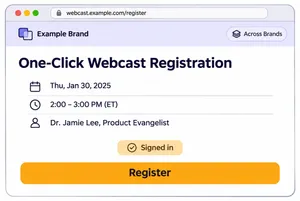
- One-click registration for signed-in users, replacing an overloaded form with a stepped interface.
- Identity provider templates and hooks updated so registration and post-registration steps work the same way across brands.
- Event platform integration. Registration and attendance sync with the Swoogo and ON24 event platforms, with webhooks replacing polling of Swoogo.
- Smoke tests after every deployment in the QA, pre-production and production environments.
Password managers now work across all three brands, and repeat webcast registration takes one action for signed-in users. Read the SSO and webcast registration case study.
Common SSO mistakes
- Relying on hidden iframes for session checks, which fail silently in browsers that block third-party cookies.
- Collecting passwords on each brand's site instead of on the identity provider's domain.
- Using the identity provider's default domain, which looks unfamiliar to users and makes phishing harder to spot.
- Treating logout as an afterthought, leaving users signed in on shared computers.
- Migrating every brand at once, which turns small configuration errors into a company-wide outage.
- Sharing all profile data with every brand without per-brand consent.
For permissions after sign-in, see our comparison of RBAC and ABAC, and for products that serve many customer organizations, our guide to single-tenant and multi-tenant architecture.
Frequently asked questions
What is single sign-on?
Single sign-on lets a user sign in once with a central identity provider and then access several applications or websites without signing in again. Each application trusts the identity provider's tokens instead of managing its own passwords.
How does SSO work across different domains?
Each domain redirects the user to a shared identity provider. The identity provider keeps its own session, so after the first sign-in it sends the user back to each new domain already authenticated. Each domain then creates its own first-party session.
Do third-party cookie restrictions break SSO?
They break SSO setups that check sessions through hidden iframes. SSO built on top-level redirects and first-party session cookies on each domain continues to work in browsers that block third-party cookies.
Should I use SAML or OpenID Connect?
Use OpenID Connect for customer-facing web and mobile products. Add SAML when business customers want to sign in with their corporate identity provider, since many enterprise systems still use it.
Can passkeys work across multiple domains?
Passkeys are tied to one domain. The simplest approach is to register them on the identity provider's domain and use SSO for every brand. Related origin requests let a passkey work across a small set of related domains when federation is not possible.
To sum up
Single sign-on across multiple domains works when every brand sends users to one identity provider on its own branded domain, passwords and passkeys are only ever entered there, each brand keeps its own first-party session and logout, account merging and consent are planned up front. Roll it out one brand at a time, with automated tests of sign-in after every deployment.
.wrk builds identity, registration and integration flows for companies in the US and Europe, including single sign-on across brands, enterprise federation and the testing that keeps sign-in working.
Want one sign-in across all your brands or products? Tell us about your sites and current logins, and we will propose an SSO design and rollout plan.
Explore IT outsourcing