
Many apps check purchases inside the app until something breaks: a refund is granted but access stays open, or a user subscribes on iPhone and cannot unlock the feature on the web. Apple and Google now both expect the backend to be the source of truth, and Apple has deprecated its older receipt validation endpoint.
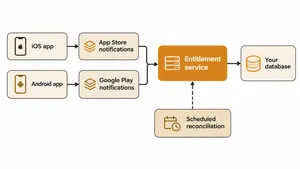
Reliable in-app subscriptions depend on one server-side entitlement record per user, updated first by signed store notifications, confirmed through the stores' server APIs and checked by a scheduled reconciliation job that catches anything the notifications missed.
This article explains the architecture, how the Apple and Google pieces work, how to map store events to one subscription state, the edge cases that cause support tickets and how a healthcare app moved its billing to this model. It does not cover web payments outside the app stores.
Key takeaways
- Keep one entitlement record per user on your server, and let the app ask the server what the user can access.
- On Apple, use StoreKit 2 in the app, App Store Server Notifications V2 for events and the App Store Server API to confirm status and recover missed events.
- On Google, verify every purchase token on the backend, acknowledge new purchases within three days or Google refunds them, and receive real-time developer notifications through Cloud Pub/Sub.
- Notifications can be missed or arrive out of order. A scheduled job that checks subscription status against the store APIs closes the gap.
- Link each purchase to your own user ID at the time of purchase, so renewals and refunds map to the right account.
- In a delivered project, a healthcare app moved billing to the App Store Server API and Google Play billing on a new backend, with notifications as the primary sync and a scheduled fallback.
The architecture
| Component | Role |
|---|---|
| App (StoreKit 2 or Play Billing Library) | Shows products, starts purchases, sends the transaction or purchase token to your server |
| Purchase verification endpoint | Receives new purchases from the app, verifies them with the store and grants access |
| Notification endpoints | Receive App Store Server Notifications and Google Play real-time developer notifications |
| Entitlement service | Holds one record per user: product, status, expiry, renewal state and history |
| Reconciliation job | Regularly checks subscription status with the store APIs and corrects any differences |
| Your other clients | Web app, other platforms and internal tools ask the entitlement service, never the stores |
The key decision is that every client asks your entitlement service what the user can access. That gives one answer across iOS, Android and web, and one place to apply refunds, promotions and support overrides.
How the Apple side works
- StoreKit 2 in the app. Purchases return signed transactions in JWS format. The app sends the transaction to your server.
- Link the purchase to your user. Set an app account token, a UUID that identifies the user in your system, when the purchase starts. It comes back in transactions and notifications, so every renewal maps to the right account.
- App Store Server Notifications V2. Apple posts signed notifications to your endpoint for subscriptions, renewals, failed renewals, grace periods, expirations, refunds, revocations and changes to auto-renew. Verify the signature before trusting the content.
- Respond correctly. According to Apple's documentation, return a status between 200 and 206 when you have processed a notification. If Apple gets no success response, it retries version 2 notifications five times, at 1, 12, 24, 48 and 72 hours after the previous attempt. In the sandbox, it tries only once.
- App Store Server API. Call Get All Subscription Statuses and Get Transaction History to confirm state, and Get Notification History to recover notifications missed during an outage.
- Retire receipt validation. Apple has deprecated the older verifyReceipt endpoint in favor of the App Store Server API, so new work should not depend on it. Apple's open-source App Store Server Library, available for several server languages, handles signature verification and API calls.
How the Google side works
- Play Billing Library in the app. Each purchase returns a purchase token, which the app sends to your backend.
- Verify on the backend. Google recommends sending every purchase token to a secure backend to verify it before granting access, and checking that a token has not already been used.
- Acknowledge within three days. New purchases must be acknowledged within three days of moving to the purchased state, or Google automatically refunds them and revokes access. Initial subscription purchases need acknowledgment, while renewals do not. Do not acknowledge purchases that are still pending.
- Real-time developer notifications. Google sends subscription and purchase events to a Cloud Pub/Sub topic, which your backend subscribes to. Notifications carry the purchase token, and your server calls the Play Developer API to fetch the full, current subscription state.
- Voided purchases. Refunds and chargebacks arrive as voided purchase notifications and can be listed through the API, so access can be removed.
One subscription state for both stores
The two stores use different event names for the same business events. Map them to one set of states in your entitlement service.
| Business event | Apple notification (examples) | Google notification (examples) | Your state |
|---|---|---|---|
| New subscription | SUBSCRIBED | SUBSCRIPTION_PURCHASED | Active |
| Renewal | DID_RENEW | SUBSCRIPTION_RENEWED | Active, new expiry date |
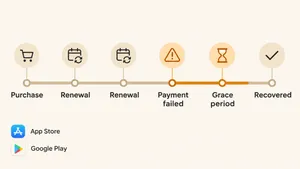
| Payment failed, retrying | DID_FAIL_TO_RENEW | SUBSCRIPTION_IN_GRACE_PERIOD or SUBSCRIPTION_ON_HOLD | Grace period or on hold |
| Auto-renew turned off | DID_CHANGE_RENEWAL_STATUS | SUBSCRIPTION_CANCELED | Active until expiry, will not renew |
| Expired | EXPIRED | SUBSCRIPTION_EXPIRED | Inactive |
| Refund or revocation | REFUND, REVOKE | SUBSCRIPTION_REVOKED, voided purchase | Inactive, flagged |
| Plan change | DID_CHANGE_RENEWAL_PREF | SUBSCRIPTION_PURCHASED for the new plan, with a link to the old one | Active on the new plan |
Treat notifications as triggers rather than as the full truth. When a notification arrives, fetch the current status from the store API and update the record from that. This removes most problems with notifications that arrive out of order or twice.
Subscriptions out of sync between the stores and your backend? We move in-app billing to server-side verification, notifications and reconciliation.
Explore healthcare softwareNotification-first sync with a fallback
Notifications are fast but not guaranteed. Endpoints go down, deployments fail and Pub/Sub messages can be redelivered.
- Process notifications first. They update most subscriptions within seconds.
- Make processing idempotent. Store each notification ID and skip any you have already handled. Our guide to idempotency explains the pattern.
- Reconcile on a schedule. A job checks subscriptions that are near expiry, in a grace period or recently changed against the store APIs, and corrects any record that drifted.
- Recover after outages. On Apple, replay missed events with Get Notification History. On Google, query the subscriptions that changed during the outage.
- Alert on silence. If no notifications arrive for an unusual period, something is wrong with the endpoint or the subscription to the topic.
Edge cases that cause support tickets
- Grace periods and account holds. Users whose payment failed may keep access for a period. Decide what your app shows and when access stops.
- Upgrades and downgrades. Plan changes may take effect immediately or at the next renewal, depending on the store and the change.
- Family sharing. On Apple, family members can share some subscriptions, which creates entitlements for users who did not buy.
- Price increases. Stores may require users to accept a price increase. Users who do not accept are not renewed.
- Refunds. Stores grant refunds without asking you. Remove access when the refund notification arrives.
- Restores and reinstalls. A user who reinstalls the app must get access back without paying again, by matching the store's records to their account.
- Sandbox timing. Test subscriptions renew on an accelerated schedule, which is useful for testing renewal logic but does not show production retry behavior.
A billing migration in a healthcare app
A Canadian healthcare startup lets patients track chronic pain and share data with clinicians and insurers. The app sells subscriptions through the App Store and Google Play. As part of a wider move to a new Symfony backend, a .wrk team moved in-app purchases to the App Store Server API v2 and Google Play billing.
- Server notifications as the primary sync. Store events update the subscription record on the backend as they happen.
- A scheduled fallback. A cron job checks status with the stores, so missed notifications do not leave users with the wrong access.
- One backend for both stores. iOS and Android purchases update the same records on the new platform.
The billing work was part of a long-running engagement in which the same team rebuilt core services, supported SOC 2 Type 2 certification and moved releases to two- or three-week cycles. Read the healthcare platform case study.
How long it takes
For an app with a few subscription products on both stores, moving to server-side verification with notifications and reconciliation usually takes four to eight weeks of backend work, plus testing in both stores' sandboxes. Migrations from older receipt-based logic take longer when existing subscribers' records must be matched to user accounts.
Notification endpoints follow the same rules as any webhook receiver: verify signatures, respond fast and process in a queue. Our guide to webhooks covers these practices.
Frequently asked questions
What is App Store Server Notifications V2?
App Store Server Notifications V2 is Apple's service that sends signed messages to your server when in-app purchase and subscription events happen, such as renewals, failed payments, expirations and refunds. Your server verifies each message and updates the user's access.
Is verifyReceipt deprecated?
Yes. Apple has deprecated the verifyReceipt endpoint and recommends the App Store Server API and signed transactions from StoreKit 2 for validating purchases and checking subscription status.
Do I need to acknowledge Google Play purchases?
Yes. New purchases, including initial subscription purchases, must be acknowledged within three days of entering the purchased state, or Google refunds them automatically and revokes access. Subscription renewals do not need acknowledgment.
How do I keep subscription status in sync across iOS, Android and web?
Keep one entitlement record per user on your server. Update it from both stores' server notifications, confirm with their APIs, reconcile on a schedule, and have every app and website ask your server what the user can access.
What happens if my server misses a store notification?
Apple retries version 2 notifications five times over several days, and you can recover missed ones with Get Notification History. Google's notifications come through Pub/Sub, which retries delivery. A scheduled reconciliation job against the store APIs catches anything still missed.
To sum up
Server-side subscription management makes your backend the single source of truth for who can access what. Verify purchases on the server, process signed store notifications as triggers to fetch current status, map both stores to one set of states, reconcile on a schedule and plan for grace periods, refunds and plan changes before they reach support.
.wrk builds and modernizes mobile and web products for companies in the US, Canada and Europe, including in-app billing, entitlement services and the backend work that keeps subscriptions accurate.
Planning to move in-app billing to your backend? Tell us about your products and stores, and we will propose a migration plan and timeline.
Explore healthcare software