For software teams, the Act turns accessibility into a release requirement. Websites, mobile apps, checkout flows, login screens and customer documents in scope must work with screen readers, keyboards, screen magnifiers and voice control, and each company must publish how its service meets the requirements. National authorities have started reviewing sites, and French courts have issued the first rulings.
A digital service that meets WCAG 2.1 Level AA across its website and apps, publishes an accessibility statement and documents any exemption it relies on covers most of what the European Accessibility Act asks of it.
This article translates the EAA into engineering work: who is in scope, which requirements land on which parts of a product, what WCAG 2.2 adds, what the work costs and how one team brought 2,000+ page types into conformance. It does not cover hardware requirements, and it is not legal advice.
Key takeaways
- The EAA covers consumer services such as e-commerce, consumer banking, e-books, passenger transport and electronic communications, and products such as computers, smartphones, e-readers, ATMs and payment terminals.
- Companies outside the EU are in scope when they serve consumers in the EU. Microenterprises providing services, meaning fewer than 10 employees and up to €2 million in annual turnover or balance sheet total, are exempt.
- The technical benchmark is EN 301 549, which references WCAG 2.1 Level AA. Version 4.1.1, published in September 2026, moves to WCAG 2.2 and gives presumption of conformity once it is cited in the Official Journal of the EU.
- Most fixes land in a handful of places: color contrast, form labels and error messages, keyboard and focus handling, alternative text, custom components and authentication.
- Enforcement is national. Germany allows fines of up to €100,000, and in June 2026 a French court gave Carrefour six months to make its website and app fully accessible, rejecting its argument that 71% compliance was enough.
- Fixing shared components and editorial templates, rather than individual pages, keeps new content compliant without a new project each time.
Is your product in scope? Five questions
1. Do you serve consumers in the EU?
The services part of the Act applies to services provided to consumers. A B2B platform used only by businesses falls outside it, although public sector buyers may still ask for EN 301 549 conformance under procurement rules. Where the company is based does not matter: a US or UK online shop selling to customers in Germany or France is covered.
2. Is your service on the list?
Article 2 of Directive (EU) 2019/882 names the services in scope:
- E-commerce services, meaning any service that sells products or services to consumers online.
- Consumer banking services, including online and mobile banking.
- E-books and the dedicated software used to read them.
- Elements of air, bus, rail and waterborne passenger transport, including websites, mobile apps, e-tickets and real-time travel information.
- Electronic communications services and services giving access to audiovisual media.
E-commerce is the widest entry. A subscription site, a marketplace, a booking engine or an online store inside a larger product all count when consumers can buy through them.
3. Are you a microenterprise?
A microenterprise employs fewer than 10 people and has an annual turnover or balance sheet total of €2 million or less. Microenterprises providing services are exempt. The exemption does not cover microenterprises that make or sell products in scope.
4. Did the service exist before 28 June 2025?
The transition rules are narrow. Service providers may keep using products they already used for the service, such as terminals, until 28 June 2030, and self-service terminals may stay in use for up to 20 years. Websites and apps are generally treated as in scope today, so a team should not plan on a transition period for its digital interfaces.
5. Would compliance be a disproportionate burden?
Article 14 lets a company rely on a fundamental alteration or disproportionate burden exception, but only after a documented assessment. Service providers must renew it at least every five years and inform the market surveillance authority when they rely on it. Authorities expect real numbers: the cost of compliance measured against the company's size and turnover. For a large company, the exception is hard to justify for core journeys such as search, checkout and account access.
What the Act asks of a digital service
Annex I of the directive sets functional requirements, and Annex V sets information requirements. In practice, they translate into the following engineering and content work.
| Requirement | What it means in the product | Typical work |
|---|---|---|
| Websites and apps must be perceivable, operable, understandable and robust | WCAG 2.1 Level AA, through EN 301 549 | Audit, component fixes, design token changes, regression tests |
| Information about the service and how it meets accessibility requirements | An accessibility statement in the terms and conditions or an equivalent page, in accessible formats | Statement page, process to update it with each release |
| Accessible identification, security and payment methods | Login, two-factor authentication, CAPTCHAs, card forms and payment confirmation screens | Accessible authentication, alternatives to puzzle CAPTCHAs, labeled card fields |
| Banking information must be understandable | Text no more complex than level B2 of the Common European Framework of Reference for Languages | Plain-language review of interface text, errors and key documents |
| E-books must work with assistive technology | Accessible files, synchronized text and audio, accessibility metadata, rights management that does not block screen readers | EPUB accessibility checks, metadata in the catalog feed, reader app testing |
| Transport information must be accessible | Websites, apps, e-tickets and real-time travel information | Accessible timetables, seat maps and ticket formats |
Where most products fail: the 2026 data
The WebAIM Million 2026 report tested the home pages of the top one million websites and found detectable WCAG failures on 95.9% of them, with an average of 56.1 errors per page. The same six problems account for most of them, and each has a clear owner in a software team.
| Failure | Share of home pages | Usual fix | Where the fix lives |
|---|---|---|---|
| Low-contrast text | 83.9% | Adjust color values to reach a 4.5:1 ratio for body text | Design tokens and theme variables |
| Images without alternative text | 53.1% | Add meaningful alt text, or mark decorative images as decorative | CMS fields and image components |
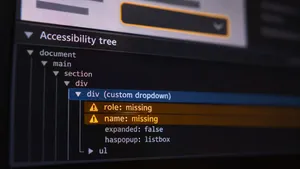
| Form inputs without labels | 51% | Connect every input to a visible label | Form components |
| Empty links | 46.3% | Give icon links an accessible name | Icon and link components |
| Empty buttons | 30.6% | Give icon buttons an accessible name | Button components |
| Missing document language | 13.5% | Set the lang attribute on every page and language version | Page templates |
Automated tools find these quickly, but they catch only part of the barriers. Keyboard traps, focus that jumps unpredictably, error messages a screen reader never announces and custom widgets such as date pickers, carousels and filters need manual testing with a keyboard and with screen readers such as NVDA, JAWS, VoiceOver and TalkBack.
WCAG 2.2: the six new criteria at Level A and AA
EN 301 549 V4.1.1, published on 2 September 2026, references WCAG 2.2 instead of WCAG 2.1. Teams starting work now should test against WCAG 2.2, since it includes everything in 2.1, apart from the obsolete Parsing criterion, and adds six requirements at Level A and AA, described in the W3C summary of WCAG 2.2.
| Criterion | What it requires | Typical engineering task |
|---|---|---|
| 2.4.11 Focus Not Obscured (Minimum), AA | The focused element is never fully hidden by other content | Stop sticky headers, cookie banners and chat widgets from covering focused elements, for example with scroll padding |
| 2.5.7 Dragging Movements, AA | Anything done by dragging can also be done with a single tap or click | Add buttons or inputs next to sliders, sortable lists, kanban boards and map controls |
| 2.5.8 Target Size (Minimum), AA | Click and tap targets are at least 24 by 24 CSS pixels, or spaced so they do not overlap | Resize icon buttons, pagination and inline links in dense tables |
| 3.2.6 Consistent Help, A | Help options appear in the same place on every page | Fix the position of chat, phone and help links in the layout |
| 3.3.7 Redundant Entry, A | Users are not asked for the same information twice in one process | Prefill billing details from shipping details, reuse data between checkout steps |
| 3.3.8 Accessible Authentication (Minimum), AA | Logging in does not depend on memory or puzzles without an alternative | Allow paste and password managers, offer passkeys or email links, replace puzzle CAPTCHAs |
Accessible authentication deserves early attention, because login and payment flows often depend on third-party components, such as identity providers, CAPTCHA services and payment pages, that the team does not control. Check the vendor's accessibility conformance report early, and plan a replacement if the component fails.
A 12-week EAA engineering plan
For a mid-size e-commerce or subscription product with a website and one or two apps, the work usually fits into a 12-week plan.
| Weeks | Work | Output |
|---|---|---|
| 1–2 | List every in-scope interface: website, apps, checkout, account area, emails, PDFs and third-party components. Choose representative pages for each template | Scope and test sample |
| 3–4 | Automated scans across the sample, then manual keyboard and screen reader testing of the main user journeys | Findings ranked by severity and by component |
| 5–9 | Fix shared components first: buttons, forms, navigation, modals, carousels and tables. Then fix templates and content | Updated component library, fixed templates |
| 10 | Replace or escalate third-party components that fail, starting with authentication and payment | Vendor decisions and workarounds |
| 11 | Retest the main journeys with assistive technologies | Conformance results per journey |
| 12 | Publish the accessibility statement, add automated accessibility checks to the release pipeline and train editors | Statement page, pipeline checks, editor guidelines |
Fixing at the component level is what makes the plan fit into 12 weeks. A form component fixed once corrects every form built with it. Fixing page by page multiplies the work and lets the same issue return with the next release.
What EAA compliance work costs
These are typical ranges for an experienced team at Central European rates. The real figure depends on how many custom components the product has and how much of the interface comes from third-party tools.
| Product | Audit and fixes | Typical timeline |
|---|---|---|
| Online store on a hosted platform with a custom theme | €8,000–€25,000 | 4–8 weeks |
| Custom e-commerce or subscription site with one mobile app | €30,000–€90,000 | 2–4 months |
| Banking or transport service with web, iOS and Android apps | €60,000–€200,000 | 3–6 months |
| Large content library or e-book catalog | Depends on the number of templates and titles; often the largest share is content, not code | 3–9 months |
After the first round, keeping a product compliant usually takes a small, steady share of front-end and QA time, an automated check in every release and an independent retest once a year.
Selling to consumers in the EU? We audit your website and apps against WCAG 2.2, fix the components and help you publish an accessibility statement you can stand behind.
Explore QA and UX servicesEnforcement so far
Each member state enforces the EAA through its own law and its own authorities, so penalties and procedures differ.
- Germany. Under the Barrierefreiheitsstärkungsgesetz, offering a non-compliant service can be fined up to €100,000 under section 37 of the act. The federal market surveillance authority for accessibility, based in Magdeburg, began operations on 26 September 2025.
- France. Disability associations apiDV and Droit Pluriel sent formal notices to four grocery retailers in July 2025 and took them to court in November. On 4 June 2026, the court in Caen ordered Carrefour to make its website and mobile app fully accessible within six months, with a penalty for each day of delay. Carrefour had argued that meeting 71% of the criteria was enough, and the court held that all applicable criteria must be met. A separate case against Auchan was dismissed in Lille in May 2026 on procedural grounds and is under appeal.
- Netherlands and Sweden. The Dutch Authority for Consumers and Markets opened audits after a reporting period that ended in October 2025, and the Swedish Post and Telecom Authority began reviewing e-commerce home pages, product pages and search functions the same month.
The French ruling carries the clearest lesson for product teams. A score, a partial fix or an overlay widget on top of inaccessible code does not count as compliance. What counts is whether a person using assistive technology can complete the journey.
A large remediation in practice
One of the largest education technology companies in the US needed accessibility documentation to keep selling to schools and universities. Its portal spans 30+ publisher journals and over 2,000 unique page types, each with its own layout, rich media and interactive components. The requirement came from US procurement, but the work is the same kind of work the EAA asks of publishers and e-commerce teams in Europe.
A five-person .wrk team of frontend, backend and QA engineers ran the program.
- Audit on the most complex pages first. An external accessibility partner audited the pages with the highest density of components, so the findings covered every component type in the library.
- Automated and manual testing. axe DevTools sorted violations by severity and component, and testing with NVDA on Windows and VoiceOver on macOS covered what automated tools miss.
- Component fixes. Headings, lists, text elements and multimedia were updated to meet WCAG criteria, and new components were built to accessibility requirements from the start.
- 1,000+ pages redesigned. Page appearance, navigation and accessibility tools were reworked across the library.
- An editorial framework. Content editors received templates and documentation that let them publish compliant pages without developer involvement.
- Ongoing monitoring. Automated checks continued after launch to catch regressions.
The library reached WCAG 2.0 AA and WCAG 2.1 AA conformance, and the accessibility documentation buyers required was completed. The editorial framework matters most for long-term compliance: new pages stay accessible because the templates enforce it. Read the EdTech accessibility case study.
If you also sell to public sector buyers in the US or the EU, you will likely be asked for an accessibility conformance report. Our guide on how to get a VPAT for your software covers the document and the testing behind it.
Common mistakes
- Relying on an overlay widget. Overlays change how a page looks, but they leave the underlying code, labels and focus handling as they were.
- Testing only the home page. The barriers that stop purchases are usually in filters, product options, cart, checkout and account pages.
- Ignoring third-party components. Payment pages, identity providers, chat widgets and cookie banners are part of the service a customer uses.
- Forgetting documents and emails. Order confirmations, invoices, contracts and PDFs sent to customers need to be accessible too.
- Treating compliance as a one-time project. Without checks in the release pipeline and trained editors, new barriers appear within a few releases.
For a broader view of how site performance, structure and accessibility work together, see our guide to building a B2B website that performs.
Frequently asked questions
Does the European Accessibility Act apply to companies outside the EU?
Yes. The EAA applies to services provided to consumers in the EU, wherever the company is based. A US or UK company that sells online to consumers in EU member states needs to meet the requirements for those services.
Does the EAA apply to B2B software?
The services part of the EAA covers services provided to consumers, so software sold only to businesses is generally outside it. B2B vendors that sell to public sector bodies may still be asked to meet EN 301 549 under public procurement rules.
Which WCAG version does the European Accessibility Act require?
The EAA itself sets functional requirements, and conformity is shown through the harmonised standard EN 301 549. The version in use references WCAG 2.1 Level AA. Version 4.1.1, published in September 2026, references WCAG 2.2 Level AA, so new work should target WCAG 2.2.
What are the penalties for not complying with the EAA?
Penalties are set by each member state. Germany allows fines of up to €100,000, and courts can order companies to fix their services within a deadline, with daily penalties for delay, as a French court did with Carrefour in June 2026.
Does an accessibility overlay make a website EAA compliant?
No. Overlay widgets do not fix missing labels, broken focus order, inaccessible custom components or unannounced errors in the underlying code, which are the barriers that stop people with disabilities from completing a purchase.
To sum up
The European Accessibility Act makes accessibility a condition for selling digital services to consumers in the EU. For software teams, the work comes down to WCAG 2.1 or 2.2 Level AA across websites and apps, accessible login and payment flows, a published accessibility statement and a release process that keeps new barriers out. Fixing components and templates, rather than pages, is what keeps the effort and the cost under control.
.wrk helps software companies in Europe and the US audit, fix and maintain accessibility across websites, apps and large content libraries, with component-level fixes and editorial frameworks that keep new content compliant.
Not sure how far your product is from EAA compliance? Send us your website or app, and we will propose an audit with a fixed scope, price and timeline.
Explore QA and UX services