
Caching is usually the cheapest way to make a slow application fast and a busy one stable. It is also where many hard bugs come from: users see old prices, one customer sees another's data, or every cache entry expires at once and the database falls over. The difference lies less in the technology than in the decisions behind it.
An effective caching strategy starts by caching the parts of a response that many users share and that change rarely, at the layer closest to the user that can safely hold them, and it defines how each cached item is invalidated before it goes live.
This article explains the caching layers in a web application, the main caching patterns, how to handle invalidation and cache stampedes, and three real caching changes with measured results. It does not cover CPU or hardware caches.
Key takeaways
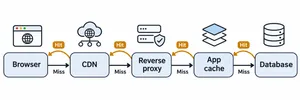
- Web applications can cache at five layers: the browser, the CDN, a reverse proxy, the application and the database.
- The main patterns are cache-aside, read-through, write-through and write-behind. Cache-aside is the most common starting point.
- Every cached item needs an invalidation rule: a time to live, an event that clears it, or both.
- Protect the backend against stampedes, when many requests miss the cache at once, with request coalescing and serving stale content while refreshing.
- Never cache personalized responses in shared caches without varying the key by user or tenant.
- In delivered projects, caching shared page fragments made a CMS about three times faster under load, and precomputed aggregations cut database load on a live feed by about ten times.
The caching layers in a web application
| Layer | What it holds | Typical lifetime | Controlled by |
|---|---|---|---|
| Browser | Static files, images, some API responses | Minutes to a year for versioned files | HTTP headers such as Cache-Control |
| CDN | Pages, images, files and API responses close to users | Seconds to days | CDN rules and HTTP headers |
| Reverse proxy | Full pages or fragments in front of the application | Seconds to hours | Proxy configuration, such as Varnish or nginx |
| Application cache | Computed results, query results, sessions, rendered fragments | Seconds to hours | Code, using Redis, Memcached or in-memory stores |
| Database | Query plans, buffer pool, materialized views | Managed by the database | Database configuration and schema design |
The closer a layer sits to the user, the more traffic it absorbs and the less control you have over removing stale copies. Versioned static files, whose names change when their content changes, can live in browsers and CDNs for a year. A product price shown on a page should live there for minutes at most, or be cleared on change.
The main caching patterns
| Pattern | How it works | Good for | Trade-off |
|---|---|---|---|
| Cache-aside | The application checks the cache, and on a miss reads the database and stores the result | Most read-heavy data | The first request after a miss is slow, and data can be stale until the entry expires or is cleared |
| Read-through | The cache itself loads missing data from the database | Simpler application code | Needs a cache layer that supports loaders |
| Write-through | Writes go to the cache and the database together | Data that is read right after it is written | Every write is slower, and rarely read data fills the cache |
| Write-behind | Writes go to the cache and reach the database later | Very high write volumes, counters | Risk of losing writes if the cache fails |
| Precomputation | Results are calculated in advance and stored ready to serve | Dashboards, aggregates, feeds | Results are only as fresh as the last computation |
Start with cache-aside for reads and precomputation for expensive aggregates. Reach for the other patterns only when measurements show a need.
Cache invalidation strategies
Phil Karlton's well-known remark that "there are only two hard things in computer science: cache invalidation and naming things" survives because it keeps proving true. Four approaches cover most needs.
- Time to live (TTL). Each entry expires after a fixed time. Simple and safe, but data can be stale for up to the TTL.
- Event-based invalidation. When the data changes, the application deletes or updates the related cache entries. Fresh, but every code path that changes the data must remember to do it.
- Versioned keys. The cache key includes a version or timestamp of the data, so a change creates a new key and the old entry simply stops being used.
- Tags. Entries are tagged with the records they depend on, such as a product ID, and clearing a tag clears every page or fragment that used it. Many CDNs and frameworks support this.
In practice, combine an event-based or tag-based clear for freshness with a TTL as a safety net, so a missed invalidation corrects itself.
Protecting the backend from cache stampedes
When a popular entry expires, hundreds of requests can miss the cache at the same moment and all hit the database together. Three techniques prevent this.
- Request coalescing. Only one request rebuilds the entry, and the others wait for its result. Many CDNs and reverse proxies do this automatically.
- Serve stale while revalidating. Keep serving the old entry for a short time while one request refreshes it in the background. HTTP supports this with the stale-while-revalidate and stale-if-error extensions defined in RFC 5861.
- Add jitter to expiry times. Randomize TTLs slightly, so entries created together do not all expire together.
Caching personalized content safely
Shared caches, such as CDNs and reverse proxies, serve the same response to everyone who sends the same key. Caching a page that contains a user's name, cart or account data in a shared cache can show it to other users.
- Mark personalized responses as private or no-store in the Cache-Control header, as described in MDN's HTTP caching guide.
- Split pages into shared and personal parts. Cache the shared page and load the personal parts separately, or assemble them with fragment caching.
- In multi-tenant products, include the tenant ID in every application cache key.
- Never use cookies or authorization headers as part of a CDN key without understanding how many variations that creates.
Pages slow under traffic or databases near their limits? We profile your application, design caching at the right layers and measure the results.
Explore IT outsourcingThree caching changes and what they saved
Fragment caching on a multi-site CMS
A US law firm runs several marketing websites on Verba, a custom content management system. Bots hitting pages that could not be cached pushed the server to its limit. Profiling showed that rendering the same header and footer for every request was the main bottleneck, even though those parts rarely changed and were identical for all visitors. A .wrk team cached these shared fragments, so each page request rendered only its own content. Load tests run with wrk and oha before and after the change showed pages about three times faster under load. Read the Verba CMS case study.
Multi-layer caching on a media site with 30–50 million page views a month
The Daily Meal, a US food site with 1.7 million recipes and 250 GB of images, struggled with speed and uptime on customized hosting. .wrk moved it to managed Drupal hosting and built caching in layers: Drupal's page cache, reverse proxy rules and Akamai CDN configuration, with images moved to a dedicated server that resizes them on demand. The share of HTML responses delivered in 0.5 seconds or less rose to 80%, up from 50%, and the share of full page loads under 7 seconds rose to 60%, up from 20%. Read The Daily Meal case study.
Precomputed aggregations for a live security feed
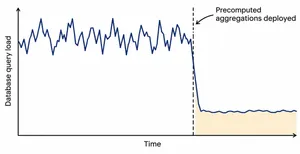
A threat intelligence platform for a US cybersecurity media company shows a live feed of security events on a public website. The feed relied on aggregated event data, and calculating it on every request put heavy load on the database. The team precomputed the event aggregations as part of the processing pipeline and served them ready-made, which cut database load on the live feed by about ten times. Read the NEXUS case study.
How to choose what to cache
- Measure first. Find the slowest and most frequent requests and queries, using application performance monitoring or database logs.
- Look for shared, stable work. Data many users request and few users change is the best candidate.
- Pick the outermost safe layer. Cache at the CDN if the response is the same for everyone, in the application if it varies by user or tenant.
- Write the invalidation rule before enabling the cache: what clears it, and the maximum acceptable staleness.
- Monitor hit ratio and freshness. A low hit ratio means the cache costs memory without saving work. Stale data complaints mean invalidation is missing somewhere.
- Load test the change. Compare throughput and response times before and after. Our guide to load testing covers how.
Common caching mistakes
- Caching without measuring. Caches added on guesses add complexity without fixing the real bottleneck.
- No invalidation plan. Users see old data, and teams respond by clearing everything, which causes a stampede.
- Caching personal data in shared layers. One user's page is served to another.
- Keys that are too specific. Including query strings or tracking parameters in keys creates millions of entries that are never reused.
- Treating the cache as the database. A cache can be emptied at any moment. The system must work, slower, without it.
Frequently asked questions
What are the main caching strategies?
The main caching patterns are cache-aside, read-through, write-through, write-behind and precomputation. They differ in when data is loaded into the cache and when writes reach the database. Cache-aside, where the application fills the cache on a miss, is the most common.
What is cache invalidation?
Cache invalidation is removing or updating cached data when the original data changes, so users do not see stale information. Common approaches are time-based expiry, clearing entries on change events, versioned keys and tag-based clearing.
What is a cache stampede?
A cache stampede happens when a popular cache entry expires and many requests try to rebuild it at the same time, overloading the database. Request coalescing, serving stale content while one request refreshes it and randomized expiry times prevent it.
Should I cache at the CDN or in the application?
Cache at the CDN when a response is the same for many users, such as public pages, images and files. Cache in the application when results vary by user or tenant, or when you need fine control over invalidation.
What is a good cache hit ratio?
It depends on the layer and the content. CDNs serving static files often reach 90% or higher, while application caches for varied data may run lower. Track the ratio over time and check whether hits are saving the expensive work you intended to avoid.
To sum up
A good caching strategy caches shared, stable work at the outermost layer that can safely hold it, defines invalidation before launch and protects the backend from stampedes. Measure before and after: real projects show that caching the right fragments or precomputing the right aggregates can make an application several times faster and cut database load by an order of magnitude.
.wrk improves the performance of web platforms for companies in the US and Europe, with profiling, caching at the CDN, proxy and application layers, and load testing to prove the results.
Want your application faster without a rewrite? Share your traffic and stack, and we will propose a caching plan with expected results.
Explore IT outsourcing